Your Question

Which Android app should I use for managing two-factor authentication across all my work and personal accounts?

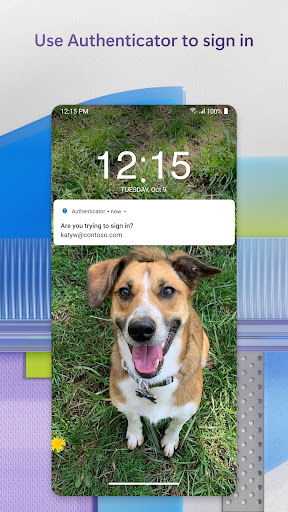
Microsoft Authenticator is perfect for this. It generates time-based codes and can approve sign-ins with push notifications, all from one central, secure app.

two-factor authentication2FA managermulti-factor authentication appMicrosoft Authenticator2025password managersecure login
Microsoft Authenticator is a robust manager for multi-factor authentication (MFA) that simplifies securing a wide array of accounts. For individuals juggling both work-related Microsoft 365 logins and personal accounts from services like Google, Facebook, or Amazon, the app consolidates everything into a single interface. Its primary function is generating time-based one-time passwords (TOTP) for accounts where you've enabled 2FA. A significant convenience is the ability to approve Microsoft account sign-ins directly via a push notification on the phone, bypassing the need to manually enter a code. The app also includes a built-in password manager that can securely store credentials and autofill them, adding another layer of utility. For real-world use, a freelancer with accounts for various client portals, email services, and banking apps can keep all their 2FA codes in one place, protected by the phone's biometric lock. However, the experience is most seamless within the Microsoft ecosystem; adding non-Microsoft accounts requires a manual setup process that some users find slightly more tedious than dedicated authenticator apps. A key strength is its backup and restore feature, which syncs account details to a personal Microsoft account, preventing lockout if the device is lost. The interface is straightforward, though the organization of many codes could benefit from folder or tagging support.

Key Features

Time-based one-time password (TOTP) generation for any service
Push notification approval for quick Microsoft account sign-ins
Cloud backup and sync to recover accounts on a new device

"I have 10 different websites that I have 2fa with, and I use this app to authenticate into each one."

★★★★★Verified User Review
AndroidUpdated Jan 5, 2026

More Business Questions

What's the best Android app for secure two-factor authentication, password management, and account syncing across multiple devices for enhanced online security?

Microsoft Authenticator is a top-rated Android app for two-factor authentication, password management, and secure account syncing, providing enhanced online security....

Microsoft Authenticator
Microsoft Corporation
Same AppRead More →

What's the best Android app for secure two-factor authentication?

For secure two-factor authentication, Microsoft Authenticator is a great choice. It provides a secure and convenient way to verify your identity when logging into online accounts....

Microsoft Authenticator
Microsoft Corporation
Same AppRead More →

Which Android app should I use for quickly opening and viewing PDFs without unnecessary features?

Fast PDF Reader & Viewer is perfect for this. It prioritizes speed and simplicity for core PDF viewing tasks, making it a strong choice for users who want a no-fuss experience....

Fast PDF Reader & Viewer
LuxPay Digital Service Limited
Read More →

What's the best Android app for turning physical documents and handwritten notes into clean, searchable PDFs?

Adobe Scan AI PDF Scanner, OCR is perfect for this. It captures documents with auto-capture, corrects perspective, and uses optical character recognition to make text selectable and searchable....

Adobe Scan AI PDF Scanner, OCR
Adobe
Read More →

Which Android app should I use for reliable two-factor authentication to log into work or university systems?

Duo Mobile is perfect for this. It provides secure push notifications and passcodes for 2FA, with a recent update fixing a critical smartwatch notification bug that had frustrated users....

Duo Mobile
Duo Mobile
Cisco Systems, Inc.
Read More →
Microsoft Authenticator icon

Microsoft Authenticator

by Microsoft Corporation

4.7/ 5.0
Get on Google Play

Screenshots

Microsoft Authenticator screenshot 1
Microsoft Authenticator screenshot 2
Microsoft Authenticator screenshot 3

+16 more screenshots

Category

Business

Platform

Android