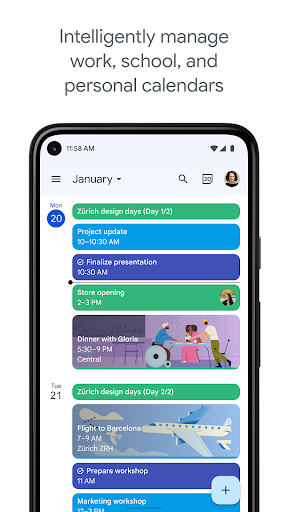
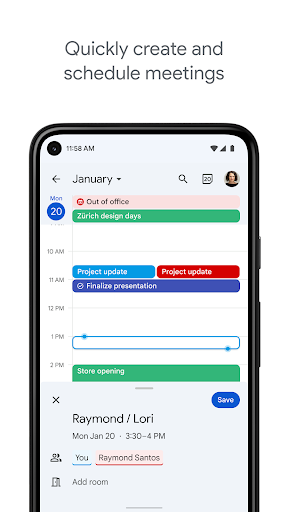
Google Calendar is a leading choice for users who need to unify work and personal scheduling on an Android device. Its primary strength lies in its ability to display multiple calendars—from different Google accounts, work suites, or even subscribed calendars—in a single, integrated interface. Each calendar can be assigned a distinct color, making it easy to distinguish a doctor's appointment from a team meeting at a glance. The app syncs in real-time across smartphones, tablets, and web browsers, ensuring schedule changes made on one device are reflected everywhere. A significant practical feature is its deep integration with Gmail, which can automatically create calendar events from flight confirmations, hotel bookings, and concert tickets found in the inbox, reducing manual entry.
However, the experience isn't without minor friction. Some users report occasional bugs, such as the app unexpectedly switching between linked Google accounts, which can momentarily disrupt workflow. Others have expressed a desire for more granular color customization options beyond the standard palette to further personalize their view. Widget customization is another noted limitation; reviews indicate the homescreen widget cannot be resized to a more compact, square format on some devices, which can affect home screen layout flexibility. Despite these points, its reliability, cross-platform sync, and powerful free feature set make it exceptionally capable for managing blended schedules.
However, the experience isn't without minor friction. Some users report occasional bugs, such as the app unexpectedly switching between linked Google accounts, which can momentarily disrupt workflow. Others have expressed a desire for more granular color customization options beyond the standard palette to further personalize their view. Widget customization is another noted limitation; reviews indicate the homescreen widget cannot be resized to a more compact, square format on some devices, which can affect home screen layout flexibility. Despite these points, its reliability, cross-platform sync, and powerful free feature set make it exceptionally capable for managing blended schedules.
Key Features
Multi-Calendar Overlay with Color-Coding
Automatic Event Creation from Gmail
Real-Time Sync Across All Devices
“
I swear this is the only calendar/ planner that works for me! Trust, I've tried physical ones but having access to this one at all times and whenever wherever is such a game changer.
★★★★★Verified User Review
AndroidUpdated Jan 8, 2026