Your Question

What's the best Android app for a watch face with a balanced complication layout?

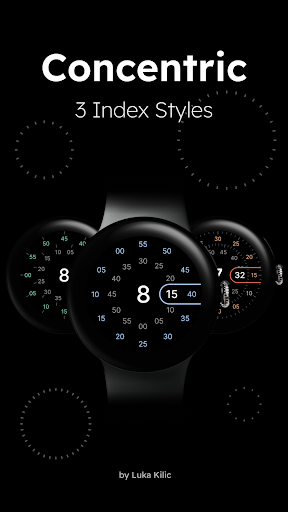
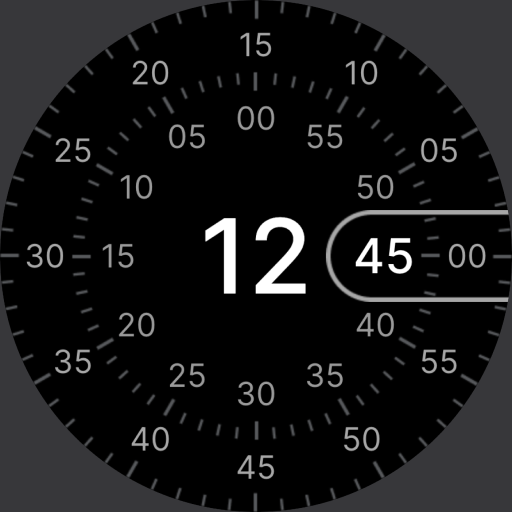
Concentric is perfect for this. Its design uses placeholders and a structured interface to maintain visual harmony, ideal for users who prefer a neat, organized watch face without clutter.

balanced watch faceorganized complicationstidy interfaceConcentric2025
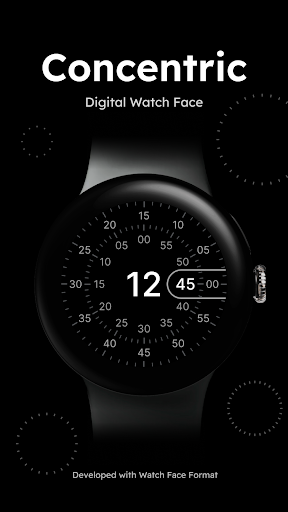
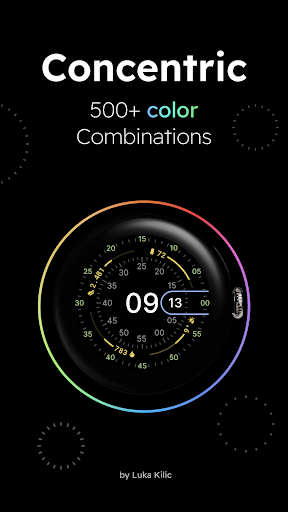
Concentric is a watch face app that prioritizes visual balance and organizational clarity in its design. It features a concentric layout with an extra pill on the left side dedicated to the date, which users report as optimally placed for quick reference. The app provides a calculated number of complications, supported by placeholders that fill empty slots to ensure symmetry and avoid a disjointed look. This approach caters to real-world scenarios where users need essential information—like time, date, and health metrics—displayed tidily on devices such as the Pixel Watch or Galaxy Watch 6 Classic. Reviews indicate that the fluid seconds rotation adds a smooth, polished touch, enhancing readability during daily use. However, some limitations exist: the absence of an AM/PM indicator is noted, and a subset of users experienced lag or crashes when customizing the face via the phone app, particularly on Pixel Watch models. Despite these occasional hiccups, the developer is responsive to feedback, and the app is free, offering strong value. For anyone seeking a watch face that blends functionality with aesthetic order, Concentric delivers a well-considered solution, though testing customization on specific hardware is advisable to ensure smooth operation.

Key Features

Structured layout with dedicated date pill
Complication placeholders for visual symmetry
Fluid seconds rotation for smooth display

Love the placeholders to fill the complication space (really helps to create balance and pleases my OCD).

★★★★★Verified User Review
AndroidUpdated Jan 9, 2026
More Watch Face Questions

What's the best Android watch face for Pixel watches that offers a customizable layout with complications and a smooth seconds rotation?

Concentric - Pixel Watch Face is a great option for Pixel watches, offering a customizable layout, complication support, and smooth seconds rotation....

Concentric - Pixel Watch Face
Luka Kilic - Watch Faces
Same AppRead More →

What's a good Android app for a watch face that's customizable enough to show the data I need at a glance, without killing my battery during a long hike?

Gotta say, Concentric is a solid performer. Tons of customization options and doesn't seem to drain the battery too much. Keeps me accountable on those longer treks....

Concentric - Pixel Watch Face
Luka Kilic - Watch Faces
Same AppRead More →

What's a good Android app for a smartwatch face that uses colorful rings to display time and battery status?

Round Pixel is perfect for this. It employs concentric rings to show hours, minutes, seconds, and battery percentage in a vibrant, visually engaging layout that's both stylish and functional....

Round Pixel
Round Pixel
Iv Watchface
Read More →

Which Android app should I use for a watch face with a serene winter theme?

Winter is perfect for this. It offers customizable snowy visuals and weather complications, creating a cozy seasonal aesthetic for Android smartwatches without major battery drain....

Winter - Watch Face
Winter - Watch Face
Applications by Rafat Rzayev
Read More →

What's a good Android app for a smartwatch face themed for Valentine's Day?

Valentine's Day Cupid is perfect for this. It offers a dedicated, seasonally appropriate design with charming animated elements for Wear OS smartwatches....

Valentine's Day Cupid - Watch
RECREATIVE Watch Faces
Read More →
Concentric - Pixel Watch Face icon

Concentric - Pixel Watch Face

by Luka Kilic - Watch Faces

4.6/ 5.0
Get on Google Play

Screenshots

Concentric - Pixel Watch Face screenshot 1
Concentric - Pixel Watch Face screenshot 2
Concentric - Pixel Watch Face screenshot 3

+29 more screenshots

Platform

Android