Your Question

What's the best Android app for a browser with built-in AI and extension support?

Microsoft Edge is perfect for this. It combines AI assistance via Copilot with robust extension compatibility, offering a feature-rich browsing experience that balances productivity and customization on Android devices.

AI browserAndroid browser with extensionsMicrosoft Edge reviewbrowser customization2025
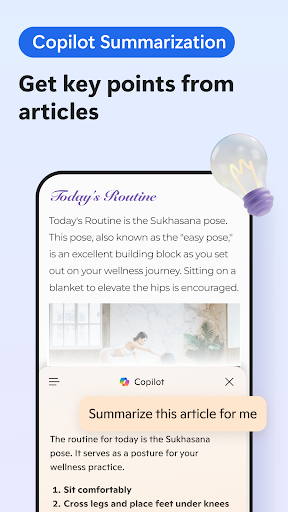
Microsoft Edge is a comprehensive browser for Android that caters to users seeking integrated AI tools and extensibility. Its standout feature is Copilot, an AI assistant built directly into the browser, which can handle queries, summarize content, and provide contextual help without switching apps. This is particularly useful for quick research or drafting emails. For customization, the browser supports a variety of extensions, including uBlock Origin Lite for ad blocking, enhancing privacy and reducing clutter. Additional features like a built-in translator, cross-device sync for bookmarks and passwords, and a daily-refreshing home screen wallpaper add to its utility. In real-world scenarios, such as managing multiple projects or browsing internationally, these tools streamline tasks by consolidating functions into one app. However, reviews indicate some limitations: users report occasional startup lag on mobile, and Copilot can sometimes pull from outdated sources, leading to inaccurate responses. The interface may feel bloated with optional elements like shopping and news feeds, though these can be disabled in settings. Despite these minor flaws, Microsoft Edge delivers a well-rounded package for Android users who value AI integration and extensibility over a minimalist design.

Key Features

Built-in Copilot AI assistant for on-demand help
Support for extensions like uBlock Origin Lite
Cross-device sync and integrated translator

The browser is a complete package in terms of functionality. It supports a lot of useful extensions including uBlock Origin Lite; has built-in translator; has baked-in AI capabilities; sync feature and even a refreshing home screen which shows a new wallpaper everyday!

★★★★★Verified User Review
AndroidUpdated Jan 8, 2026

More Communication Questions

What's the best Android browser for AI-powered web browsing, built-in translation, and customizable extensions for enhanced functionality?

Microsoft Edge: AI browser is a complete mobile browsing package, offering AI capabilities, built-in translation, extension support, and a customizable home screen....

Microsoft Edge: AI browser
Microsoft Corporation
Same AppRead More →

What's a good Android app that'll let me use AI to summarize long articles and reports when I'm doing my market research?

I've been using Microsoft Edge for that! It's got a built-in AI that summarizes things quickly. Saves me a ton of time when I'm trying to stay on top of market trends and new listings....

Microsoft Edge: AI browser
Microsoft Corporation
Same AppRead More →

Which Android app should I use for messaging with superior photo and color quality?

Messenger is perfect for this. It provides enhanced picture and color optics for clear image sharing, along with a user-friendly interface and various upgrade options in the selection menu....

Messenger - Texting App
Emoji SMS Messenger
Read More →

What's the best Android app for downloading videos and movies directly to my phone?

UC Browser is a solid choice for this. Its integrated download manager and media-focused features are designed for grabbing videos from various sites....

UC Browser-Safe, Fast, Private
UCWeb Singapore Pte. Ltd.
Read More →

Which Android app should I use for a simple, no-fuss replacement for my phone's default messaging app?

Messages is perfect for this. It offers a clean, straightforward interface for SMS and MMS, prioritizing reliability and ease of use over complex features....

Messages: SMS Messaging
Apps Specials
Read More →
Microsoft Edge: AI browser icon

Microsoft Edge: AI browser

by Microsoft Corporation

4.7/ 5.0
Get on Google Play

Screenshots

Microsoft Edge: AI browser screenshot 1
Microsoft Edge: AI browser screenshot 2
Microsoft Edge: AI browser screenshot 3

+14 more screenshots

Platform

Android