Best Workflow Apps for iOS - September 2025
These apps are the best for streamlining tasks, enhancing productivity, and integrating seamlessly with iOS. They offer unique features that cater to various workflow needs, from automation to team collaboration.
Our Top Pick
The best workflow app for iOS

Shortcuts by Apple
Apple
Why It's #1
- Voice command triggers
- Pre-built shortcut gallery
- Real-time action suggestions
Screenshots


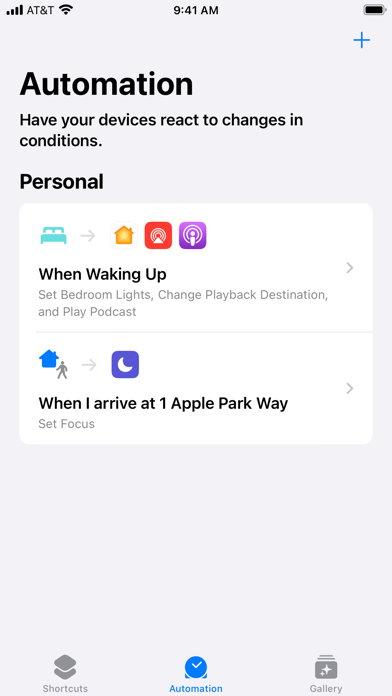
About Shortcuts by Apple
Create custom automations or choose from hundreds of built-in actions in your favorite apps — like Calendar, Camera, Reminders, and more — to help you accomplish everyday tasks with a simple tap from the Home Screen, by asking Siri, or even automatically. Use the Shortcuts app to: • Add a Home Screen icon that calls a loved one • Make animated GIFs • Make PDFs from Safari And so much more... Shortcuts opens up incredible possibilities to automate things you do regularly on your iPhone and iPad.
Overview
These apps are the best for streamlining tasks, enhancing productivity, and integrating seamlessly with iOS. They offer unique features that cater to various workflow needs, from automation to team collaboration.
Ideal for professionals, students, and anyone looking to organize their work and life more efficiently on iOS devices.
We evaluated based on user ratings, features, ease of use, pricing, and real user feedback to ensure comprehensive insights.
Why Shortcuts by Apple is Our #1 Pick
Key Reasons:
Deep integration with iOS ecosystem
Extensive automation capabilities
Free and user-friendly
Standout Features:
Custom automation creation
Built-in actions for popular apps
Siri integration
"Users love how it simplifies daily tasks with just a tap, making automation accessible to everyone."
- What users love most
Our Recommendations
Best Overall
Shortcuts by Apple
Offers the deepest integration with iOS, free, and highly customizable for various automation needs.
💚 Best Free
Shortcuts by Apple
Completely free with no hidden costs and powerful features for automation.
💎 Best Premium
Notion: Notes, Tasks, AI
Paid plans unlock advanced AI and database features, providing exceptional value for power users.
Easiest to Use
WorkFlowy: Note, List, Outline
Minimalist design and straightforward interface make it very easy for beginners to start organizing.
Most Innovative
Notion: Notes, Tasks, AI
Incorporates AI for content generation and offers unparalleled flexibility in a single app.
The 11 Best workflow Apps
Shortcuts by Apple
Pros:
- Free to use
- Highly customizable automations
- Excellent Siri support
Cons:
- Steep learning curve for beginners
- Limited cross-platform compatibility
The ultimate automation tool for iOS, seamlessly integrating with Apple's ecosystem to enhance productivity.

WorkFlowy: Note, List, Outline
Pros:
- Clean, distraction-free interface
- Easy to use for quick note-taking
- Good for hierarchical lists
Cons:
- Limited features compared to full project management apps
- No built-in collaboration tools
A minimalist yet powerful outlining app that helps users organize thoughts and tasks with ease.

Asana: Work Management
Pros:
- Great for team projects
- Visual task boards and timelines
- Integrates with many tools
Cons:
- Can be overwhelming for solo users
- Free version has limitations on features
A robust project management app that excels in team collaboration and task tracking.

WorkFlow
Pros:
- Tailored for specific industries
- Helps automate manual processes
- Free to use
Cons:
- Niche audience limits general usability
- May not be intuitive for non-specialists
A specialized app for managing workflows in construction and industrial settings, offering unique tools for documentation.

Evernote - Notes Organizer
Pros:
- Cross-platform sync
- Rich text and media support
- Powerful search capabilities
Cons:
- Free plan has storage limits
- Can feel cluttered with too many features
A versatile note-taking app that syncs across devices, ideal for capturing and organizing ideas on the go.

ClickUp - Manage Teams & Tasks
Pros:
- Highly customizable
- Supports various project methodologies
- Integrates with many apps
Cons:
- Complex interface can be daunting
- Performance issues on older devices
An all-in-one app that replaces multiple tools, offering extensive features for task and team management.

Flow - Focus & Pomodoro Timer
Pros:
- Minimalist design reduces distractions
- Easy to use for short focus sessions
- Free with no ads
Cons:
- Lacks advanced features like task integration
- Not suitable for complex project management
A simple yet effective timer app designed to enhance focus and productivity using the Pomodoro technique.

Trello: organize anything!
Pros:
- Intuitive drag-and-drop interface
- Great for visual thinkers
- Free for basic use
Cons:
- Can become messy with large projects
- Limited automation in free version
A visual tool that uses boards, lists, and cards to organize projects and tasks in a flexible way.

Notion: Notes, Tasks, AI
Pros:
- Extremely versatile and customizable
- AI integration enhances productivity
- Free plan offers substantial features
Cons:
- Steep learning curve for new users
- Can be slow to load on large pages
A powerful all-in-one workspace that combines notes, tasks, databases, and AI features for comprehensive organization.

My Virtual WorkFlow
Pros:
- Specialized for dental workflows
- Includes a relaxation lounge
- Free to use
A niche app for dental professionals, offering virtual workflow solutions and a relaxation feature.

Rev: Record & Transcribe
Pros:
- High-quality audio capture
- Accurate transcription services
- Secure and reliable
Cons:
- Transcription services can be costly
- Limited to audio-based workflows
An app focused on audio recording and transcription, ideal for professionals needing accurate text from speech.
Comparison Insights
Key Differences
Apps differ in focus: automation (Shortcuts), note-taking (WorkFlowy, Evernote), team management (Asana, ClickUp), and niche applications (WorkFlow, My Virtual WorkFlow).
How to Choose
Consider your primary need: automation, collaboration, simplicity, or industry-specific features; check for iOS compatibility and pricing.
Common Limitations
Many apps have learning curves, limited free features, and may not support cross-platform use seamlessly.
Emerging Trends
Increased use of AI for automation and content generation, better mobile integration, and more specialized apps for specific industries.
Key Insights
Workflow apps vary from general automation to specialized tools; integration with iOS and AI features are trending; free versions often suffice for basic needs.
Buying Guide
Essential Features
- •Cross-device sync
- •User-friendly interface
- •Basic automation or task management
Nice to Have
- •AI integration
- •Advanced collaboration tools
- •Customizable templates
⚠️ Red Flags
- •High cost for limited features
- •Poor user reviews
- •Lack of iOS optimization
Pricing Expectations
Most apps offer free versions with paid plans ranging from $5-$15/month for additional features; evaluate based on your usage needs.
Frequently Asked Questions
What is the best workflow app for beginners?
Start with WorkFlowy or Trello for their simplicity and ease of use, allowing you to get organized without a steep learning curve.
How do I choose between free and paid workflow apps?
Use free versions for basic needs; upgrade to paid if you require advanced features like AI, more storage, or team collaboration tools.
What's the learning curve like for these apps?
It varies: apps like Shortcuts and Notion have steeper curves due to customization, while Flow and WorkFlowy are very easy to pick up quickly.
Conclusion
The best workflow app depends on your specific needs, from automation with Shortcuts to comprehensive management with Notion. Each app offers unique strengths tailored to different users.
After careful comparison, the key differentiators in this category are: Apps differ in focus: automation (Shortcuts), note-taking (WorkFlowy, Evernote), team management (Asana, ClickUp), and niche applications (WorkFlow, My Virtual WorkFlow).
Our Final Recommendation
For most iOS users, Shortcuts is the top choice due to its free cost and deep integration, but explore others based on whether you need team collaboration, note-taking, or specialized features.
What We're Hoping to See in the Future
Expect more AI-driven features and better cross-platform integration in workflow apps, making them even more essential for productivity in the coming years.
Current Trends: Increased use of AI for automation and content generation, better mobile integration, and more specialized apps for specific industries.