Best Team Collaboration Apps for iOS - September 2025
These apps are the best for team collaboration on iOS due to their seamless integration of communication, project management, and AI features, ensuring efficient teamwork in any setting. They stand out for their user-friendly interfaces and robust functionality that adapts to various work environments.
Our Top Pick
The best team collaboration app for iOS

Zoom Workplace by Zoom Communications, Inc.
Zoom Communications, Inc.
Why It's #1
- AI-driven summaries
- Integrated whiteboard and docs
- Cross-platform compatibility
Screenshots

About Zoom Workplace by Zoom Communications, Inc.
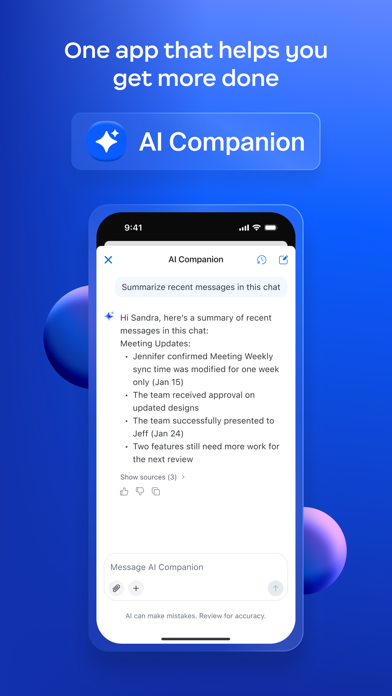
Reimagine teamwork with Zoom Workplace, an AI-first, open collaboration platform that combines team chat, meetings, phone*, whiteboard, calendar, mail, docs, and more. Use Zoom Workplace for iOS with any free or paid Zoom license. And with your Pro or Business Zoom license you have access to AI Companion woven throughout Zoom Workplace. You can get caught up quickly with a summary and key points from your unread messages, draft new content, and keep conversations focused and impactful. It’s your personal assistant across Zoom Workplace, available at no additional cost with your paid Zoom license, available wherever you are from your mobile device. BE MORE PRODUCTIVE ON THE GO WITH AI COMPANION* ON YOUR MOBILE DEVICE Quickly get prepared for upcoming meetings Have AI Companion* generate a first draft of content Get a summary of your unread Team Chat messages STREAMLINE COMMUNICATIONS WITH A SINGLE APP Schedule or join a video meeting with one tap Chat with colleagues and external contacts Place and receive phone calls or send SMS text messages* IMPROVE PRODUCTIVITY Organize and share information at scale with Zoom Docs Receive automated meeting summaries with AI Companion* Brainstorm on virtual whiteboards BOUNCE BETWEEN LOCATIONS Move a live meeting or call seamlessly between devices with one tap Start a Zoom Rooms meeting and share content* Multitask with Picture in Picture on iPhone or Split View on iPad WORK SAFELY ON THE GO Stay focused on the road with Apple CarPlay support Customize Siri Shortcuts for hands-free voice commands Keep your data secure with enterprise-grade security and SSO* * A paid Zoom Workplace subscription or other license may be required to use certain product features. Upgrade your free account today to start gaining these benefits. AI Companion may not be available for all regions and industry verticals. Some features not currently available across all regions or plans and are subject to change. UPGRADE YOUR FREE ACCOUNT TO ZOOM WORKPLACE PRO AND GET AI COMPANION INCLUDED Host unlimited meetings up to 30 hours each Record meetings to the cloud (up to 10GB) Assign meeting co-hosts and schedulers Your Zoom Workplace Pro subscription will automatically renew unless you cancel at least 24 hours before the end of the free trial or the plan billing period. After you start your subscription, you can manage it from either App Store settings or iOS settings. The amount charged to the payment method in your App Store account will vary by the plan you select and your country. The plan price will be displayed before you start your free trial or confirm your purchase. We’d love to hear from you! Join the Zoom community: https://community.zoom.com/ Follow us on social media @zoom Terms of Service: https://explore.zoom.us/terms/ Privacy Statement: https://explore.zoom.us/privacy/ Have a question? Contact us at https://support.zoom.com/hc
Overview
These apps are the best for team collaboration on iOS due to their seamless integration of communication, project management, and AI features, ensuring efficient teamwork in any setting. They stand out for their user-friendly interfaces and robust functionality that adapts to various work environments.
Professionals, remote teams, and students need these apps to streamline communication, manage projects, and enhance productivity in a mobile-first world, making collaboration effortless and effective.
We evaluated based on features, ease of use, pricing, user reviews, and innovation, focusing on real-world performance and value.
Why Zoom Workplace by Zoom Communications, Inc. is Our #1 Pick
Key Reasons:
AI-first platform with comprehensive tools
High user rating and positive feedback
Seamless integration of chat, meetings, and docs
Standout Features:
AI-powered collaboration
All-in-one workspace
Easy mobile connectivity
"Users love its ease of use and reliability, with many praising the magic-like connectivity and effectiveness for meetings and classes."
- What users love most
Our Recommendations
Best Overall
Zoom Workplace by Zoom Communications, Inc.
Offers the most comprehensive feature set with AI integration, high user satisfaction, and versatility for various team sizes.
💚 Best Free
Lark - Team Collaboration by LARK TECHNOLOGIES PTE. LTD.
Provides a full suite of collaboration tools at no cost, with a high rating and focus on reducing app switching.
💎 Best Premium
Microsoft Teams by Microsoft Corporation
Worth paying for advanced features and deep integration with Microsoft Office, ideal for enterprises.
Easiest to Use
Chanty - Team Collaboration by Chanty, Inc.
Designed for simplicity with an intuitive interface, making it perfect for beginners and small teams.
Most Innovative
Webex by Cisco
Leads with AI-powered meeting summaries and secure, continuous teamwork features, setting trends in the category.
The 11 Best team collaboration Apps
Zoom Workplace by Zoom Communications, Inc.
Pros:
- Free to use with extensive features
- High-quality video and audio
- User-friendly interface
Cons:
- Limited free meeting time
- Can be resource-intensive on devices
An AI-first collaboration platform that excels in combining multiple tools for seamless teamwork.

Lark - Team Collaboration by LARK TECHNOLOGIES PTE. LTD.
Pros:
- All-in-one solution reducing clutter
- Free with no hidden costs
- Intuitive design
Cons:
- Less known brand may lack integrations
- Limited advanced features in free version
A unified platform that eliminates app switching, making team communication effortless and efficient.

Microsoft Teams by Microsoft Corporation
Pros:
- Strong integration with Office apps
- Free version with good features
- Reliable performance
Cons:
- Desktop updates can be disruptive
- Dark mode issues in mixed environments
A robust app ideal for work and education, integrating seamlessly with Microsoft ecosystem.

Samepage: Team Collaboration by Paylocity
Pros:
- Multi-feature integration
- Free to use
- Good for project tracking
Cons:
- Lower rating suggests usability issues
- May lack advanced AI features
A comprehensive tool that combines chat, video, and task management for effective team projects.

Convo – Team collaboration by Convo Corp
Pros:
- Secure information sharing
- Smart notifications
- Free with essential features
Cons:
- May not support video conferencing well
- Limited third-party integrations
Focuses on secure, real-time messaging and notifications to keep teams organized and productive.

Zoom Workplace for Intune by Zoom Communications, Inc.
Pros:
- Enhanced security features
- Free for management purposes
- Seamless with Zoom ecosystem
Cons:
- Targeted only at admins, not end-users
- Limited functionality for general use
A specialized version for IT admins to manage and secure corporate data on personal devices.

Chanty - Team Collaboration by Chanty, Inc.
Pros:
- Easy to use
- Free with basic features
- Good for small teams
Cons:
- May lack advanced integrations
- Not as feature-rich as competitors
A simple app designed to improve productivity by centralizing team communication without app switching.

Zoho Cliq - Team Communication by Zoho Corporation
Pros:
- Context-aware messaging
- Free with good features
- Integration with Zoho suite
Cons:
- Learning curve for automation features
- May not be as popular as bigger names
Brings context to communications with automation and task management, ideal for optimized teamwork.

JANDI: Team Collaboration Tool by Toss Lab, Inc.
Pros:
- Enterprise-grade features
- Free version available
- Good for large teams
Cons:
- Lower user satisfaction per rating
- May have usability issues
A tool used by many enterprises for collaboration, though with a lower rating indicating some drawbacks.

Webex by Cisco
Pros:
- High-quality video meetings
- AI summary features
- Free with robust options
Cons:
- Can be complex for new users
- May have higher resource usage
A secure and reliable app for continuous teamwork with excellent video quality and AI features.

Basecamp - Project Management by 37Signals LLC
Pros:
- Refreshingly simple interface
- Free for basic use
- Good for project tracking
Cons:
- Limited real-time communication features
- Not as integrated as other apps
A simple and effective project management platform that avoids complexity, perfect for focused teamwork.
Comparison Insights
Key Differences
Apps range from all-in-one platforms like Zoom and Microsoft Teams to specialized tools like Basecamp for project management; some focus on security (e.g., Zoom for Intune), while others emphasize simplicity (e.g., Chanty).
How to Choose
Consider team size, need for video vs. chat, integration with existing tools, security requirements, and budget; free apps are great for starters, but paid plans offer more features.
Common Limitations
Free versions may have time limits or reduced functionality; not all apps support advanced AI or third-party integrations well; mobile apps can lack desktop features.
Emerging Trends
Increased use of AI for summaries and automation, better mobile optimization, and enhanced security measures for remote work.
Key Insights
AI integration is becoming standard, free versions often suffice for small teams, and ease of use varies significantly; security features are crucial for enterprise use, and mobile performance is a key differentiator.
Buying Guide
Essential Features
- •Real-time messaging and video conferencing
- •File sharing and collaboration
- •Task and project management tools
Nice to Have
- •AI automation and summaries
- •Third-party app integrations
- •Advanced security options
⚠️ Red Flags
- •Poor user reviews indicating bugs
- •Hidden costs in free versions
- •Lack of mobile optimization
Pricing Expectations
Most apps offer free versions with basic features; paid plans typically range from $5 to $20 per user per month for advanced capabilities like increased storage, better security, and more integrations.
Frequently Asked Questions
What are the key features to look for in a team collaboration app?
Focus on real-time communication, file sharing, task management, ease of use, and security features to ensure effective teamwork.
How do I decide between a free and paid collaboration app?
Choose free for small teams with basic needs; opt for paid if you require more storage, advanced features, or better security for larger teams.
Is there a steep learning curve for these apps?
It varies; apps like Chanty and Basecamp are easier to learn, while others like Microsoft Teams may require more time due to extensive features.
Conclusion
The best team collaboration apps for iOS in 2025 offer a mix of AI innovation, ease of use, and comprehensive features, with Zoom Workplace leading due to its all-in-one approach. Free options like Lark provide great value, while paid apps excel in advanced functionalities.
Our Final Recommendation
For most users, start with Zoom Workplace for its versatility; choose based on specific needs like security or project management.
What We're Hoping to See in the Future
Expect more AI integration, enhanced mobile experiences, and stronger security measures as remote work continues to evolve.
Current Trends: Increased use of AI for summaries and automation, better mobile optimization, and enhanced security measures for remote work.