Best Fitness Tracker Apps for iOS - November 2025
These top-rated fitness tracker apps for iOS excel in accuracy, user experience, and feature depth, helping you monitor workouts, nutrition, and habits effectively. They stand out for their high user ratings and innovative tools that cater to diverse fitness needs.
Our Top Pick
The best fitness tracker app for iOS

Hevy - Workout Tracker Gym Log
Hevy Studios S.L.
Why It's #1
- Custom workout routines
- Exercise history analytics
- Social sharing options
Screenshots

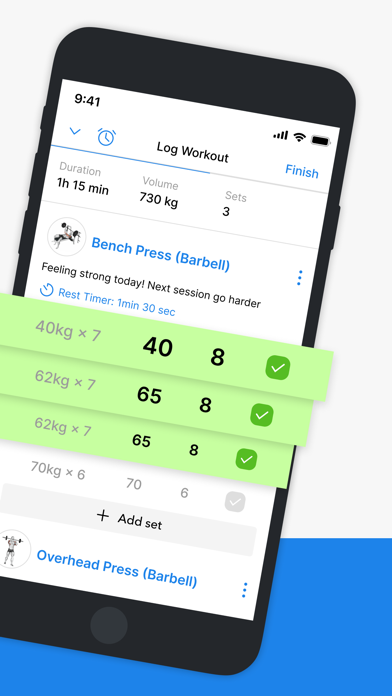

About Hevy - Workout Tracker Gym Log
** Featured by Apple ** Join +9 million users! Hevy is the most intuitive workout tracker & planner in the world. No ads and free. Plan your weight lifting routines, log your workouts and track your exercise progress. Join a growing community and get started today - for free! WHAT USERS ARE SAYING • "Seriously the best workout tracker I've ever used. Simple. Free. Tons of graphs. Amazing quality videos" - Sam Ilelaboye • "Seeing what my friends and other athletes are working out at the gym has totally changed my experience. Now I can copy my friend's workouts and compare myself. It's super motivating" - Jaume • "Tracking my workouts with Hevy has taken my training to the next level, I'm getting stronger every week. Being able to plan my routines really helps me being efficient at the gym." - Carlos D. FEATURES • Track your lifts with an intuitive, simple to use interface. • Use the calendar to stay on top of your training schedule • Hundreds of exercises with free high-quality videos for you to focus on your form • Follow your friend's progress by following their lifts and copying their routines • Create your own custom exercises for your workouts • Set up your profile as a private profile or a public one • Mark sets as Warmup, Normal, Drop sets, Failure and Supersets • Customize automatic rest timers for each exercise • Analyze your workout sessions in detail with muscle group graphs • Calculation of One Rep Max for all strength exercises • Create an unlimited amount of routines • Analyze the progression of your lifts with beautiful full-screen graphs of volume, best weight & total reps • Copy your friends' workouts • Dark Mode • Hevy uses HealthKit and CareKit to export your Hevy workouts into the Health app, this feature can be turned on in the settings. APPLE WATCH • Live sync your Apple Watch workout with your phone • Use your Hevy routines on your Apple Watch • Easily track your weight lifting sets • Use Hevy Apple Watch Complications on your Watch Face • Keep track of your heart rate during your workout • Helpful timers for duration exercises • Mark sets as Warmup, Normal, Drop sets, or Failure • Watch workouts automatically save when reconnecting to iPhone iOS FEATURES • Use the latest iOS technology • Live activity on your lock screen • Dynamic island to never lose track of your workout • Widgets for quick access • Fully featured iPad app • iMessage stickers to lift Hevy DETAILS • https://www.hevyapp.com • https://www.instagram.com/hevyapp • https://www.facebook.com/hevyapp • https://www.twitter.com/hevyapp • hello@hevyapp.com HEVY PRO • Create unlimited routines • Get unlimited access to graph history • Create unlimited custom exercises • Track advanced measurements The Hevy Pro subscription automatically renews if you do not cancel it at least 24 hours before the end of the current subscription period. Your account will be charged for the next subscription period up to 24 hours prior to the current subscription’s expiration. You can manage your subscription and disable automatic renewal at any time by adjusting your Apple account settings. You have the right to withdraw from your initial subscription within 14 days of starting it. By purchasing, you accept our Terms of Use and Privacy Policy. Terms & Conditions https://www.hevyapp.com/app-terms-conditions/ Download Hevy and take your training to the next level!
Overview
These top-rated fitness tracker apps for iOS excel in accuracy, user experience, and feature depth, helping you monitor workouts, nutrition, and habits effectively. They stand out for their high user ratings and innovative tools that cater to diverse fitness needs.
Ideal for anyone from beginners to seasoned athletes, these apps provide essential tracking for weight loss, muscle gain, and overall health improvement, making fitness goals more achievable.
We evaluated apps based on user ratings, feature set, ease of use, pricing value, and real user feedback to ensure reliable recommendations.
Why Hevy - Workout Tracker Gym Log is Our #1 Pick
Key Reasons:
Highest user rating among all apps
Intuitive and ad-free interface
Comprehensive workout planning and logging
Standout Features:
Workout planner
Exercise library
Progress tracking analytics
"Users consistently praise its ease of use and effectiveness in tracking gym sessions without distractions."
- What users love most
Our Recommendations
Best Overall
Hevy - Workout Tracker Gym Log
It combines high user ratings, intuitive design, and comprehensive features without ads, making it versatile for most users.
💚 Best Free
Hevy - Workout Tracker Gym Log
Offers robust tracking and planning tools at no cost, with no ads interfering with the experience.
💎 Best Premium
MyFitnessPal: Calorie Counter
Its premium version provides deep nutrition insights and advanced analytics, justifying the cost for serious health tracking.
Easiest to Use
StepsApp Pedometer
With a simple interface and motivational elements, it's ideal for beginners starting with basic activity tracking.
Most Innovative
Fitbod: Gym & Fitness Planner
Uses AI to generate customized workouts based on available equipment and user progress, setting it apart in personalization.
The 11 Best fitness tracker Apps
Hevy - Workout Tracker Gym Log
Pros:
- No ads
- Easy workout planning
- Detailed exercise tracking
Cons:
- Limited to gym-focused workouts
- May lack nutrition tracking
An intuitive, ad-free workout tracker perfect for detailed gym logging and progress monitoring.

Strong Workout Tracker Gym Log
Pros:
- Intuitive interface
- Quick logging
- Customizable routines
Cons:
- Basic free version
- Limited advanced analytics
A simple and powerful workout tracker that helps you achieve better results with minimal effort.
Gym Workout Tracker: RepCount
Pros:
- Fast rep counting
- User-friendly design
- Goal setting
Cons:
- Focused only on gym workouts
- No nutrition integration
A quick and simple app for tracking reps and sets to maximize gym performance.

Fitbod: Gym & Fitness Planner
Pros:
- Personalized workouts
- Equipment-specific logging
- Varied exercise plans
Cons:
- Premium features locked
- Steeper learning curve
An AI-driven workout planner that customizes routines based on your equipment and goals.

StepsApp Pedometer
Pros:
- Accurate step tracking
- Motivational visuals
- Battery efficient
Cons:
- Limited to step-based activities
- No advanced workout modes
A sleek step counter that motivates daily walking without extra devices.

Running Walking Tracker Goals
Pros:
- Calorie and distance tracking
- Goal-oriented design
- Easy to use
Cons:
- Basic interface
- Limited social features
A versatile app for tracking running and walking to improve health and achieve fitness goals.

Habit Tracker
Pros:
- Easy habit scheduling
- Motivational reminders
- Broad usage beyond fitness
Cons:
- Not specialized for workouts
- Limited fitness metrics
A simple daily planner that helps build lasting habits beyond just fitness tracking.

ActivityTracker Pedometer
Pros:
- Battery efficient
- Multiple activity types
- Detailed GPS data
Cons:
- Interface could be modernized
- Limited social integration
An all-day activity tracker that records various workouts without draining battery.
Lose It! – Calorie Counter
Pros:
- Barcode scanning
- Easy calorie logging
- Weight loss goal setting
Cons:
- Premium features needed for advanced insights
- Can be repetitive
A effective calorie counter that simplifies weight loss through easy tracking and barcode scanning.

MyFitnessPal: Calorie Counter
Pros:
- Extensive food database
- Macro tracking
- Focused on health without social distractions
Cons:
- Premium required for detailed analytics
- Can feel overwhelming initially
A comprehensive food and fitness tracker that helps manage nutrition and exercise for long-term health.

Apple Fitness
Pros:
- Seamless Apple integration
- Comprehensive activity details
- Trend analysis
Cons:
- Lower user rating
- Subscription required for full features
A fitness app integrated with Apple ecosystem, offering activity tracking and subscription-based workouts.
Comparison Insights
Key Differences
Apps vary from gym-focused loggers like Hevy and RepCount to all-in-one solutions like MyFitnessPal, with some specializing in steps or habits.
How to Choose
Consider your primary goal (e.g., weight loss, muscle gain, habit building), preferred activity types, and need for nutrition tracking vs. workout logging.
Common Limitations
Most apps lack advanced medical insights, require subscriptions for premium features, and may not integrate well with non-Apple devices.
Emerging Trends
Increased use of AI for personalized plans, focus on mental health through habit tracking, and better battery optimization for continuous monitoring.
Key Insights
- •
High-rated apps often excel in simplicity and specialized tracking
- •
User reviews highlight the importance of ad-free experiences and accountability
- •
Integration with nutrition and habit tracking enhances overall fitness management
- •
Battery efficiency and GPS accuracy are critical for outdoor activities
- •
AI and customization features are emerging as key differentiators
Buying Guide
Essential Features
- •Accurate activity tracking
- •Goal setting and progress monitoring
- •User-friendly interface
Nice to Have
- •Nutrition integration
- •Social sharing options
- •Battery efficiency
⚠️ Red Flags
- •High subscription costs without clear value
- •Poor user reviews on accuracy
- •Overwhelming ads in free versions
Pricing Expectations
Most apps are free with in-app purchases for advanced features; expect to pay $5-$15 monthly for premium subscriptions offering detailed analytics and ad-free experiences.
Frequently Asked Questions
What are the key features to look for in a fitness tracker app?
Focus on accurate tracking for your activities, ease of use, goal setting, and integration with nutrition if needed, based on user reviews and ratings.
How do I choose between free and paid fitness tracker apps?
Start with free versions to assess basic needs; upgrade to paid if you require advanced analytics, ad-free experiences, or specialized features like AI planning.
What's the learning curve like for these fitness tracker apps?
Most are designed for easy setup, but apps with AI or comprehensive tracking may take a few days to master; beginner-friendly options like StepsApp have minimal learning curves.
Conclusion
The top fitness tracker apps for iOS in 2025 offer diverse strengths, from gym logging to habit building, with high user satisfaction driving their rankings. Choosing the right app depends on your specific fitness goals and preferences.
Our Final Recommendation
For overall use, start with Hevy; if nutrition is key, try MyFitnessPal; and for simple step tracking, opt for StepsApp to match your needs effectively.
What We're Hoping to See in the Future
Expect more AI integration, better health ecosystem connectivity, and enhanced privacy features in future updates, making fitness tracking even more personalized and secure.
Current Trends: Increased use of AI for personalized plans, focus on mental health through habit tracking, and better battery optimization for continuous monitoring.