by 文 张
Detailed Review
Key Features
- •Direct camera control: Adjusts settings like resolution and exposure on the connected drone's camera for customized aerial shots.
- •Live video feed: Streams footage directly from the drone's camera to the iOS device screen for real-time framing and monitoring.
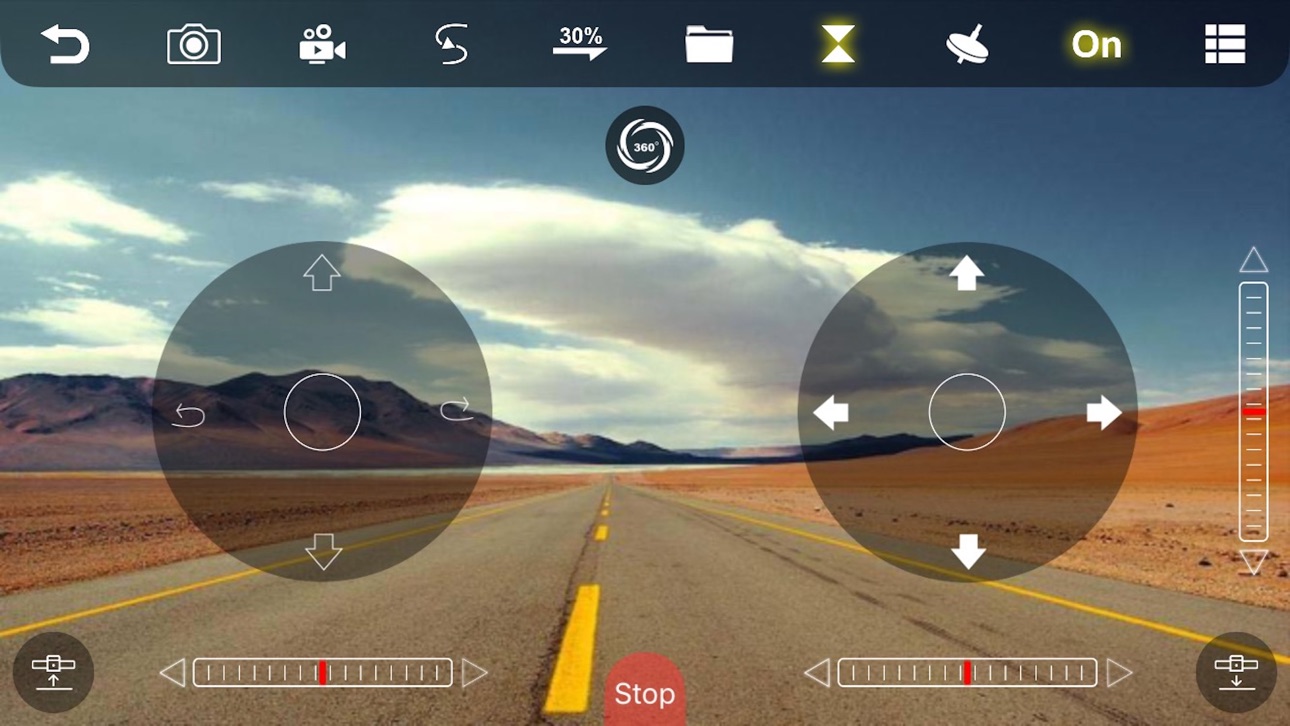
- •On-screen flight controls: Provides virtual joysticks and control panels to navigate the drone from the mobile device.
- •Device parameter adjustment: Allows users to modify various flight and system settings specific to their compatible drone model.
- •Media capture initiation: Enables triggering of photo and video recording directly from the app interface during flight.
Why Users Love It
Perfect for: Owners of specific, compatible drone models seeking an alternative control application with detailed settings access.
Screenshots



Ranking History
Track WiFi UAV's performance in Entertainment over the last 30 days
Current Rank
#42
Best Rank
#42
All-time high
Average Rank
#42
30-day average
User Reviews
People think this app is just for flying drones, but you actually have to have a drone to use this app this great because you can change the camera. You can change everything on the drone that you have. The best drone app People think this app is just for flying drones, but you actually have to have a drone to use this app this great because you can change the camera. You can change everything on the drone that you have.
OK, so I have a drone from the company that this attaches to a quick question I have- can you actually take videos in photos and send it to your album??????? that’s something I really want for this I guess you can add some more OK, so I have a drone from the company that this attaches to a quick question I have- can you actually take videos in photos and send it to your album??????? that’s something I really want for this
Can someone explain me how to connect the camera and the video features please Camera Can someone explain me how to connect the camera and the video features please
I’ve never had any problem with this app. I use it to take pics because I prefer to use the physical controller. Ford what its suppost to do I’ve never had any problem with this app. I use it to take pics because I prefer to use the physical controller.
So overall if ordered or using a drink like the YCRC Drone, to use it you need to connect to the drone. You will need to turn ON the drone and go to your Wi-Fi settings, then add a new Wi-Fi connection, the drones Wi-Fi is like this "FLOW_xxxxxx" so basically search for a Wi-Fi connection that starts with "FLOW_". If you connected it, and donwload this app, WiFi UAV, go to the app and make sure your connected to the drone by Wi-Fi. If you finished the steps, click start. You will already see your drones camera, but the drones camera will mostly be bad and maybe not 1080P or 4K. But you still will be able to see pretty much anything. You will also see some controls on the sides. To get the drone to get in running, click the button on the bottom left, then you can learn to run it. Make sure you have the instruction manual to see what buttons does what. Then you can use it. Everything of the app is OK and easy to learn but if your downloaded it, it can be sketchy since it an Chinese Third-Party app, so it might secretly collect data, but it might ask you for location so maybe enter your approximate location. But it doesn't really do anything else and according to the App Store, it seems no data is being really tracked. If you have an Anti-Virus, that is very good, but one thing it can add is more features of an app in 2024 and a signal strength reader to show your connection to the drone from the device. It works great with iOS 17 and older and might with higher OS. So pretty good I meant to give a 3.5 stars but I just did 4 Ok if you understand it all, but kind of sketch to download an Chinese app So overall if ordered or using a drink like the YCRC Drone, to use it you need to connect to the drone. You will need to turn ON the drone and go to your Wi-Fi settings, then add a new Wi-Fi connection, the drones Wi-Fi is like this "FLOW_xxxxxx" so basically search for a Wi-Fi connection that starts with "FLOW_". If you connected it, and donwload this app, WiFi UAV, go to the app and make sure your connected to the drone by Wi-Fi. If you finished the steps, click start. You will already see your drones camera, but the drones camera will mostly be bad and maybe not 1080P or 4K. But you still will be able to see pretty much anything. You will also see some controls on the sides. To get the drone to get in running, click the button on the bottom left, then you can learn to run it. Make sure you have the instruction manual to see what buttons does what. Then you can use it. Everything of the app is OK and easy to learn but if your downloaded it, it can be sketchy since it an Chinese Third-Party app, so it might secretly collect data, but it might ask you for location so maybe enter your approximate location. But it doesn't really do anything else and according to the App Store, it seems no data is being really tracked. If you have an Anti-Virus, that is very good, but one thing it can add is more features of an app in 2024 and a signal strength reader to show your connection to the drone from the device. It works great with iOS 17 and older and might with higher OS. So pretty good I meant to give a 3.5 stars but I just did 4
App Details
Developer
文 张
Platform
iosRating
Last Updated
12/26/2025