Speedometer: Speed Control App - Comprehensive GPS Tracking Analysis
by Sandy Masey
0IOSNavigation
Real-time GPS speed tracking application for iOS that monitors driving metrics including speed, route, and trip statistics. Designed for commuters, road trippers, and driving enthusiasts seeking precise journey data.
Detailed Review
Speedometer: Speed Control represents a specialized GPS tracking application focused on delivering real-time driving metrics through iOS devices. The application positions itself in the navigation utilities market by emphasizing precision tracking rather than turn-by-turn directions, targeting users who require detailed performance analytics during their journeys.
The application's core functionality centers around continuous GPS data collection, displaying current speed, route mapping, distance traveled, and comprehensive trip statistics. Advanced algorithms process location data to maintain accuracy even in challenging signal conditions. The system records every journey segment with timestamped precision, allowing users to review historical performance metrics and travel patterns through organized trip logs.
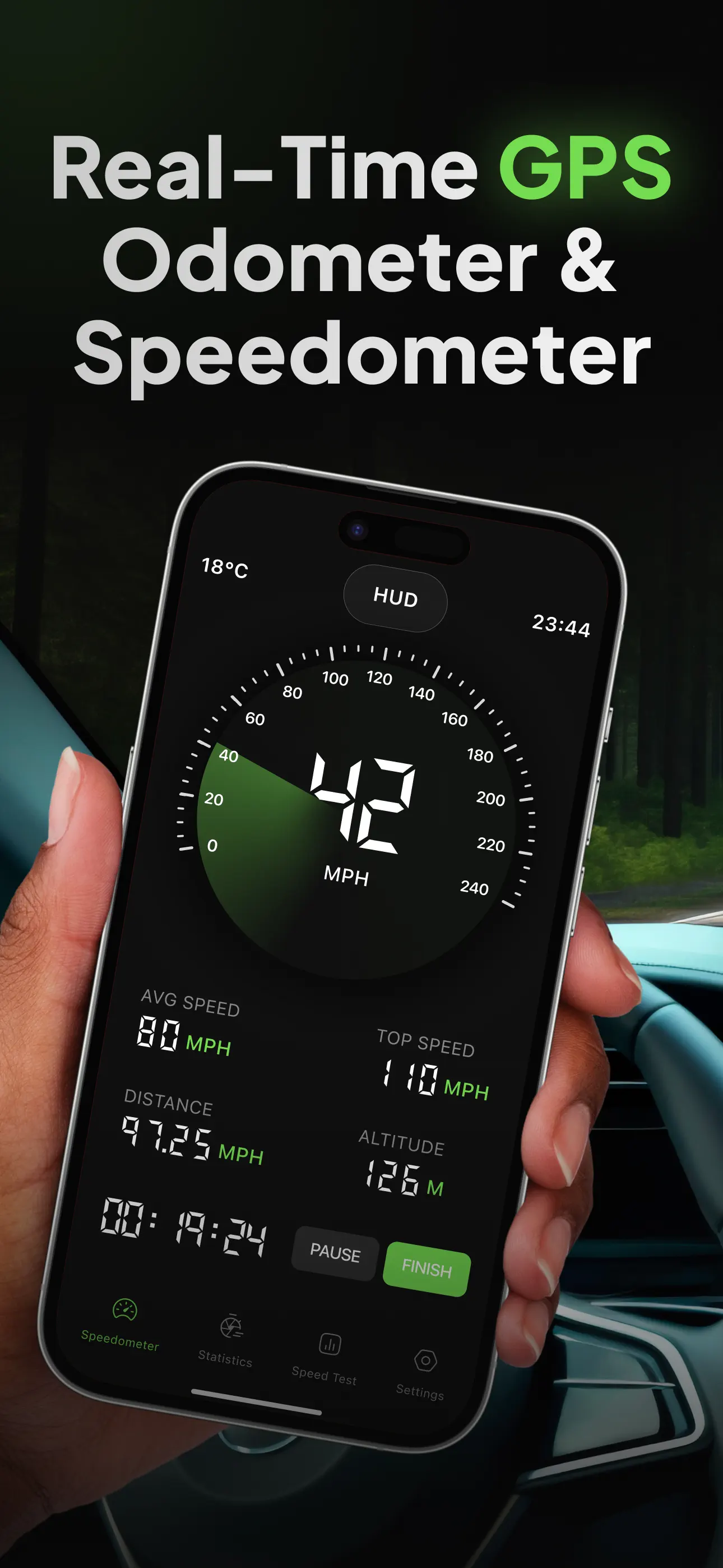
User experience revolves around a minimalist interface dominated by large, legible speed readouts complemented by secondary metrics arranged in an unobtrusive layout. The design prioritizes glanceability during operation, with color-coded elements indicating speed thresholds and automatic trip recording initiating upon motion detection. Real-world usage patterns suggest primary application during highway driving, motorcycle commuting, and recreational road trips where speed awareness becomes particularly valuable.
With no user reviews currently available, the application's reception remains undocumented. Early adopters typically seek such utilities for specific professional or recreational purposes rather than general navigation, which may explain the limited feedback pool at launch. The absence of user testimonials requires potential users to rely solely on feature specifications and developer claims regarding performance accuracy.
The application demonstrates strength in specialized GPS tracking with clean data presentation, though limitations include dependency on iOS platform exclusivity and lack of social or competitive features found in similar applications. Ideal use cases involve professional drivers monitoring fleet performance, motorsports enthusiasts analyzing track times, and safety-conscious commuters maintaining speed compliance without distracting navigation complexities.
Key Features
- •Real-time GPS speed tracking displays current velocity with continuous updates during movement, providing immediate feedback on driving pace
- •Automatic trip recording initiates tracking upon motion detection and compiles comprehensive journey statistics including duration and distance
- •Historical trip logs store completed journeys with timestamped data for performance comparison and travel pattern analysis
- •Route mapping functionality visually displays traveled paths over standard maps with options for reviewing specific journey segments
- •Customizable speed alerts notify users when exceeding preset velocity thresholds, promoting safer driving practices
- •Minimalist interface design emphasizes readability with large digital speed display and secondary metrics in subdued panels
Why Users Love It
Precise GPS data collection
Clean, focused interface design
Perfect for: Drivers seeking detailed journey analytics and speed monitoring
Screenshots



App Details
Other Navigation Apps

Waze Navigation & Live Traffic
Waze Inc.
IOS 4.8
#2
ParkMobile: Park. Pay. Go.
Parkmobile USA, Inc.
IOS 4.8
#3
Transit • Subway & Bus Times
Transit App, Inc.
IOS 4.6
#4
Shell: Fuel, Charge & More
Shell Information Technology International B.V.
IOS 4.8
#5
SpotHero: #1 Rated Parking App
SpotHero, Inc.
IOS 4.9
#6
ParkWhiz - #1 Parking App
ParkWhiz, Inc.
IOS 4.8
#7