myCal PRO Planner: Comprehensive iOS Calendar Enhancement Tool
by johnhair.com
myCal PRO Planner replaces iOS's native calendar with enhanced event visibility and customization. Professionals managing multiple calendars benefit from color-coded events and streamlined scheduling without cluttered interface elements.
Detailed Review
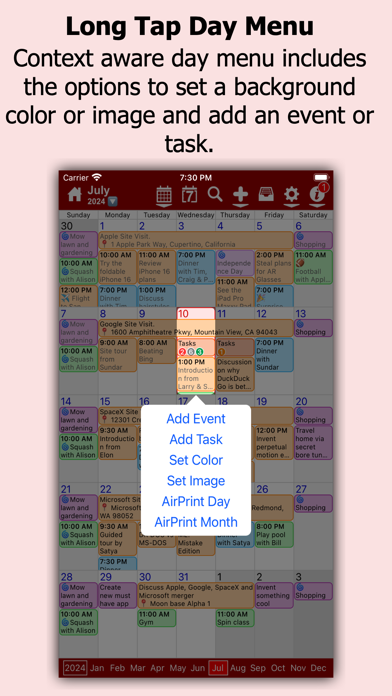
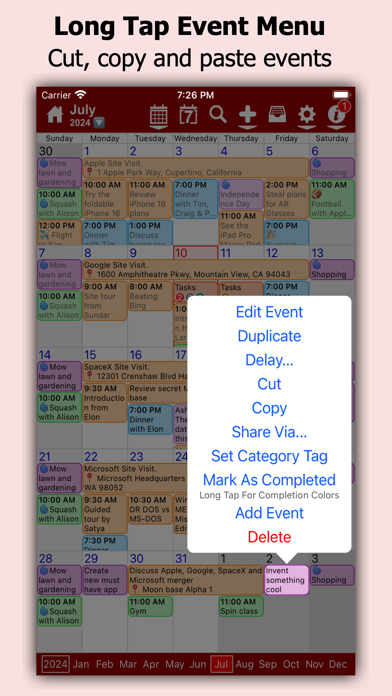
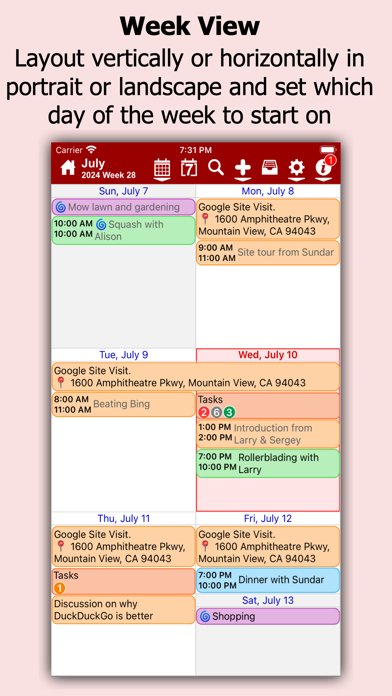
myCal PRO Planner positions itself as a premium replacement for Apple's native calendar application, focusing on enhanced visual clarity and multi-calendar management. The application directly addresses user frustrations with iOS's default dot-based event indicators by implementing full-text event displays that provide immediate context without requiring additional taps or navigation.
The core functionality centers around aggregating events from all synced calendars including Google, Yahoo, and Exchange servers while enabling granular control over display parameters. Users can create custom calendar categories (Work, Home, Sports) with individually assigned color schemes, creating immediate visual differentiation between event types. The application maintains full bidirectional synchronization capabilities, ensuring all modifications made within myCal PRO reflect across all connected calendar services in real-time.
Interface design follows minimalist principles with emphasis on typographic clarity and responsive touch controls. The month view presents events as clean text entries rather than symbolic indicators, while maintaining familiar swipe gestures for navigation between time periods. Real-world usage patterns suggest particular utility for professionals managing complex schedules across multiple domains, as the color-coding system enables rapid identification of meeting types and priorities at a glance.
With no user reviews available for analysis, the application's reception remains based on its stated feature set and design philosophy. The absence of user feedback prevents assessment of real-world reliability issues or synchronization performance across various network conditions and server configurations.
The application demonstrates clear strengths in visual organization and multi-calendar integration, though the absence of user feedback leaves questions about long-term reliability and edge-case handling. myCal PRO appears most suitable for organized professionals seeking enhanced visual management of existing calendar systems rather than those requiring new scheduling paradigms or collaborative features.
Key Features
- •Full-text event display replaces iOS's dot system, providing immediate contextual information without requiring additional navigation or taps to view details
- •Multi-calendar synchronization supports Google, Yahoo, and Exchange integration while maintaining real-time bidirectional updates across all connected services
- •Custom calendar creation with color assignment enables visual categorization of events by type, priority, or context for rapid schedule assessment
- •Category-based organization allows separate calendars for work, personal, and activity tracking with independent color schemes and display preferences
- •Native iOS integration maintains compatibility with system-level calendar notifications and synchronization while enhancing visual presentation
Why Users Love It
Enhanced visual clarity
Multi-calendar integration
Perfect for: Professionals managing multiple calendar accounts requiring clear visual organization
Screenshots



App Details
Developer
johnhair.com
Platform
iosRating
★4.7
Last Updated
9/10/2025