
by CEDAR ELECTRONICS HOLDINGS CORP.
Detailed Review
Key Features
- •Real-time traffic updates: Monitors live road conditions to suggest faster routes, helping drivers avoid congestion and reduce travel time effectively.
- •Voice-guided navigation: Offers hands-free, turn-by-turn directions in multiple languages, allowing safe focus on the road during complex drives.
- •Offline map downloads: Enables navigation without internet access by storing maps locally, useful for remote areas or data-saving scenarios.
- •Speed limit alerts: Notifies drivers of current speed limits via visual and audio cues, aiding compliance and preventing potential fines.
- •Points of interest search: Quickly finds amenities like gas stations, restaurants, and hotels along routes, enhancing travel convenience.
- •Route optimization: Calculates multiple path options based on factors like traffic, distance, or time, providing flexibility for trip planning.
Why Users Love It
Perfect for: Ideal for daily commuters and road trippers who value up-to-date traffic data and reliable navigation tools.
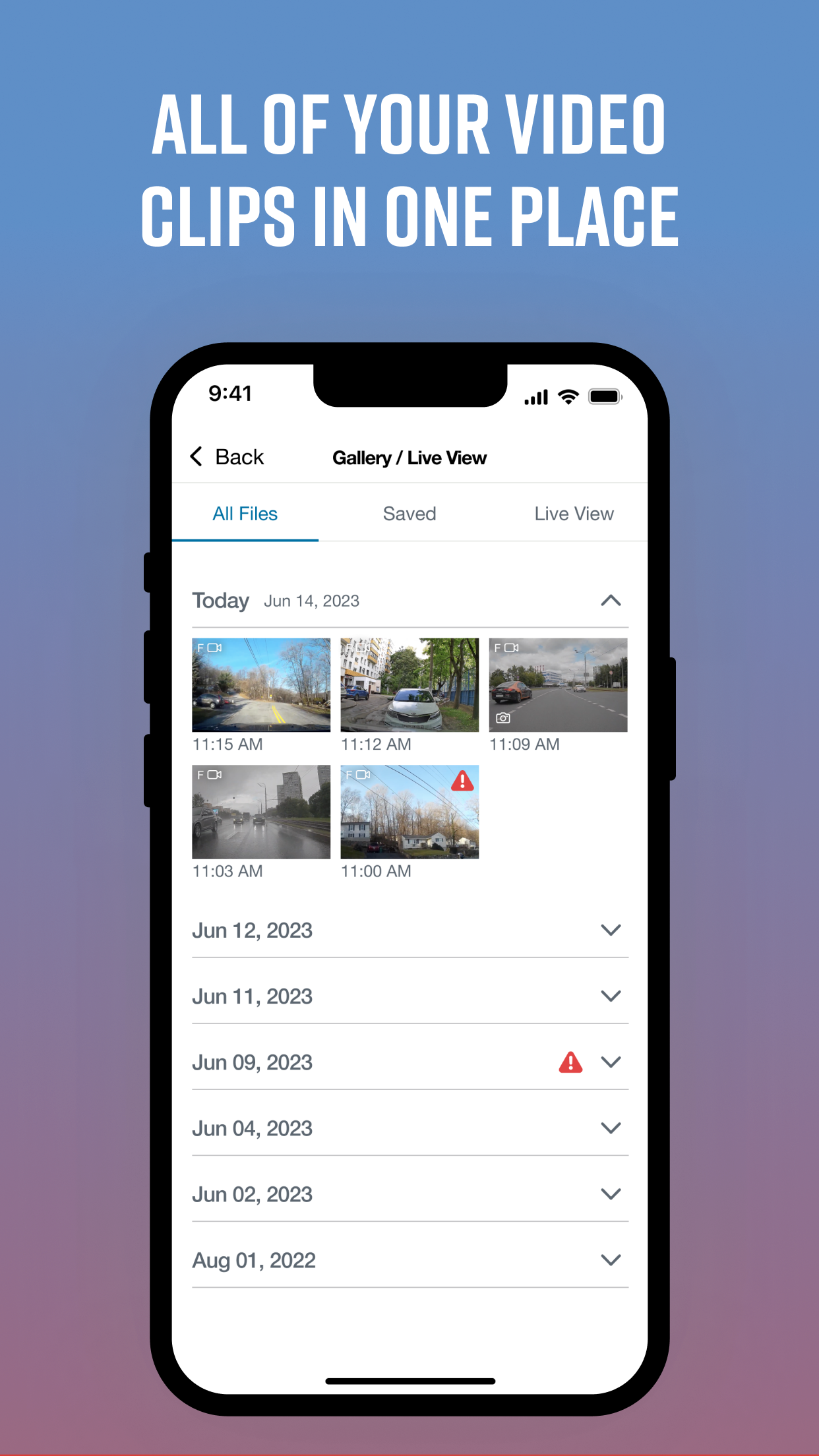
Screenshots




Ranking History
Track Drive Smarter's performance in Navigation over the last 30 days
Current Rank
#50
23 from last week
Best Rank
#15
All-time high
Average Rank
#33
30-day average
User Reviews
I’ve been a user since 2020. Bought a Cobra SC200 dash cam after I was involved in a nasty wreck in 2019. After buying a new car and setting the camera back up, I had no issues. But since I upgraded my cellphone, I have had constant issues with the app. My gallery/live view will not load on my phone from the camera, nor will my phone connect to the camera (with Bluetooth and WIFI enabled) to download the newest firmware. It gives me an error message of “cannot connect to camera” every time, even though the camera gives me the *chime* noise to let me know that connection has been established. Not sure why this is now all of a sudden a problem. App issues with camera video & firmware installation I’ve been a user since 2020. Bought a Cobra SC200 dash cam after I was involved in a nasty wreck in 2019.After buying a new car and setting the camera back up, I had no issues. But since I upgraded my cellphone, I have had constant issues with the app. My gallery/live view will not load on my phone from the camera, nor will my phone connect to the camera (with Bluetooth and WIFI enabled) to download the newest firmware. It gives me an error message of “cannot connect to camera” every time, even though the camera gives me the *chime* noise to let me know that connection has been established. Not sure why this is now all of a sudden a problem.
Is this app free? I don’t remember, I got a charged of $5.99 yesterday, downloaded app last month when me got my Scort redline 360 detector and honestly don’t remember if I must pay for service. I hope someone can respond to my comment, thanks. Free or Í need to pay? Is this app free? I don’t remember, I got a charged of $5.99 yesterday, downloaded app last month when me got my Scort redline 360 detector and honestly don’t remember if I must pay for service.I hope someone can respond to my comment, thanks.
What an amazing product, it definitely adds safety to the trip and daily traffic routine! I think I’m getting these as Christmas gifts this ! Wow Awesome ! What an amazing product, it definitely adds safety to the trip and daily traffic routine! I think I’m getting these as Christmas gifts this ! Wow
This app is awesome. I just wish more people used it and more people had the radars because the more they are the better it is and it’s lonely where I am once in a while I get into a strangler of someone with a radar but most of the time it’s just me. Really Noce This app is awesome. I just wish more people used it and more people had the radars because the more they are the better it is and it’s lonely where I am once in a while I get into a strangler of someone with a radar but most of the time it’s just me.
Update, the alert is not from this app; I was blaming the wrong thing. The app is wonderful, but there’s this (borderline harassing) alert of “You’re over the speed limit” that can not retain being toggled off. My daily commute is on technically a highway, but it has stops every mile. The speed limit goes from 35 to 50, and when I hit 36 before I pass the 50 sign, the app interrupts my music to warn me that I’m speeding. This happens about 6 times every drive to or back from work. Supposedly you can have it not do that but it does not retain the choice and you have to reset it for every drive. I’ve tried changing countless settings, disabling WiFi, Bluetooth, Cellular, Location services, reading forums, and the consensus is “That’s just how it is.” My next step will be to delete the app. Perfect Update, the alert is not from this app; I was blaming the wrong thing.The app is wonderful, but there’s this (borderline harassing) alert of “You’re over the speed limit” that can not retain being toggled off. My daily commute is on technically a highway, but it has stops every mile. The speed limit goes from 35 to 50, and when I hit 36 before I pass the 50 sign, the app interrupts my music to warn me that I’m speeding. This happens about 6 times every drive to or back from work. Supposedly you can have it not do that but it does not retain the choice and you have to reset it for every drive. I’ve tried changing countless settings, disabling WiFi, Bluetooth, Cellular, Location services, reading forums, and the consensus is “That’s just how it is.” My next step will be to delete the app.
App Details
Developer
CEDAR ELECTRONICS HOLDINGS CORP.
Platform
iosRating
Last Updated
12/5/2025
Other Navigation Apps

Waze Navigation & Live Traffic
Waze Inc.

ParkMobile: Park. Pay. Go.
Parkmobile USA, Inc.

Transit • Subway & Bus Times
Transit App, Inc.

Shell: Fuel, Charge & More
Shell Information Technology International B.V.

SpotHero: #1 Rated Parking App
SpotHero, Inc.
MTA TrainTime
Metropolitan Transportation Authority