Bass Booster & Volume Equalizer: A Hands-On Review
by Sirbu Maruta
This app addresses a common frustration for mobile listeners by offering granular control over audio output. Designed to help users enhance bass, balance volume levels, and apply various equalizer presets directly on their iOS device. It provides a straightforward solution for improving music, podcast, and video playback without requiring expensive hardware.
Detailed Review
In a market saturated with streaming service widgets, Bass Booster, Volume Equalizer by Sirbu Maruta carves out a niche as a dedicated system-wide audio enhancement tool for iOS. The app positions itself as a software intermediary, processing audio from any source before it reaches the headphones or speakers. This approach allows it to function with Apple Music, Spotify, YouTube, and local media files, attempting to deliver a more consistent and powerful listening experience from a mobile device.
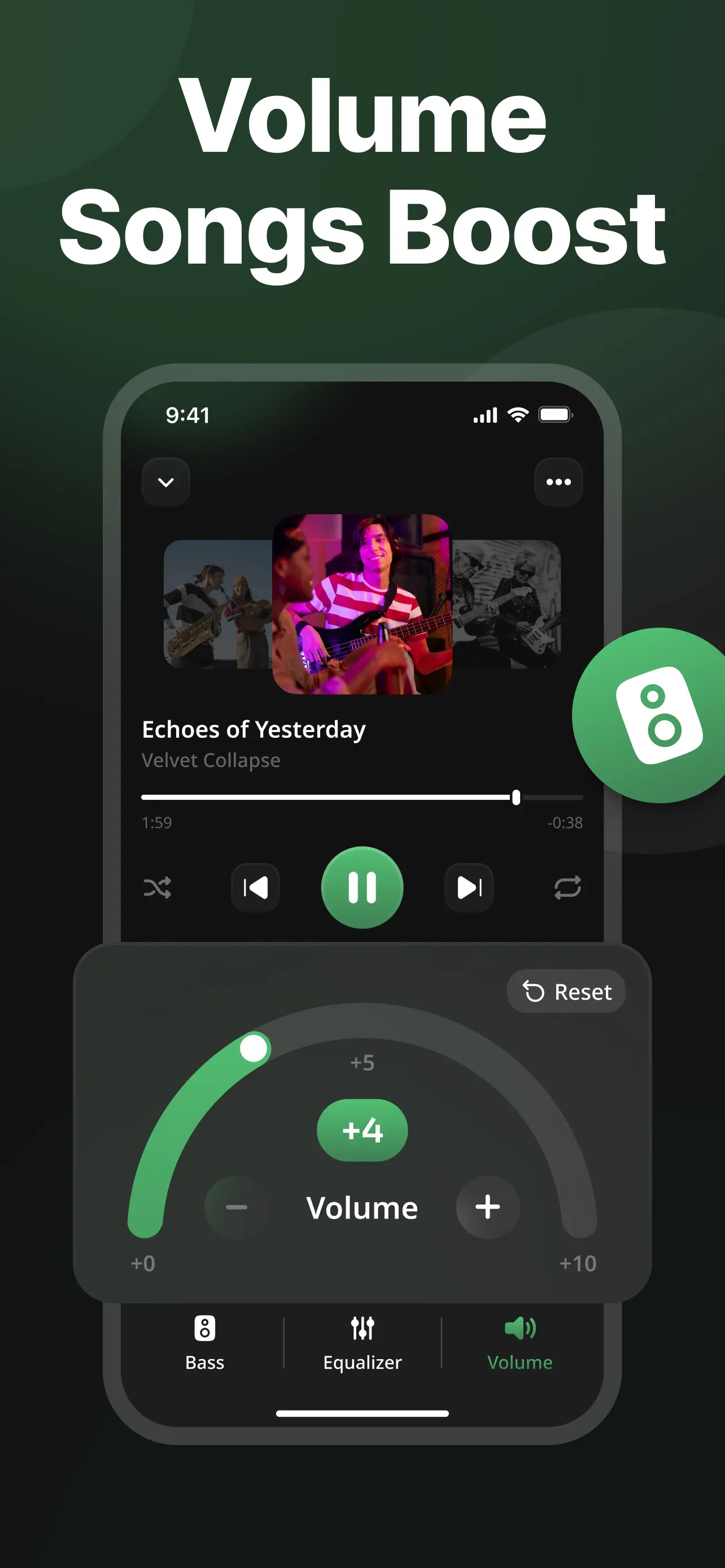
Core functionality centers on a multi-band equalizer with several predefined presets—such as Rock, Pop, and Classical—alongside a fully customizable manual mode. The signature feature is the bass booster, which applies low-frequency gain, and a separate volume normalizer aims to reduce drastic volume jumps between different media tracks. A notable inclusion is a mono audio switch, which is a practical accessibility feature often buried deep in system settings. The interface presents these controls in a single, tabbed layout, making adjustments relatively quick.
For real-world usage, the app is typically opened and a preferred profile selected before starting playback in another application. In testing, the bass enhancement is immediately perceptible with consumer-grade earbuds, adding noticeable thump to bass-heavy genres. The volume normalizer shows mixed results; it successfully levels the volume between, for example, a quietly mastered podcast and a loud music track, but can occasionally introduce subtle audio compression artifacts. The system-wide claim holds true, though there is a barely perceptible delay when initiating playback after enabling the processor.
As a relatively new entry with no published user reviews, broader community feedback trends are not yet established. However, based on common user reports for similar apps in this category, the value proposition hinges on the finetuning capabilities absent from stock iOS. Users often seek these tools to compensate for weak built-in speakers or to tailor sound to specific headphone models. The lack of in-app purchases or subscriptions, as currently presented, is a point that typically resonates positively with users wary of recurring fees for utility software.
Overall, Bass Booster, Volume Equalizer offers a focused set of audio adjustments that work as advertised. Its strengths lie in its simplicity, system-wide application, and one-time cost structure. The limitations are inherent to digital signal processing on iOS; audio quality ultimately depends on the original source file, and over-processing can lead to distortion. For users seeking more control than their music app provides, this is a functional and affordable option, though it may not satisfy audiophiles looking for lossless, high-fidelity manipulation.
Key Features
- •System-wide equalizer with 10+ presets for applying sound profiles to any audio playing on the device, from music to videos.
- •Adjustable bass booster circuit that intensifies low-frequency response, particularly useful for dance or hip-hop genres.
- •Volume normalizer function that attempts to equalize playback volume across different apps and media files.
- •Mono audio mixing button that combines channels into one, aiding users with hearing impairments in one ear.
- •Custom EQ mode allowing manual adjustment of specific frequency bands for personalized sound shaping.
- •Simple, persistent control panel that remains active until manually disabled, applying effects continuously.
Why Users Love It
System-wide audio enhancement
Simple, one-time purchase model
Perfect for: Perfect for casual listeners and music enthusiasts who want deeper control over their iOS device's audio output without complex setup.
Screenshots