Xbox Family Settings icon
Microsoft's Xbox Family Settings App: A Hands-On Review for Modern Parents

by Microsoft Corporation

โ˜…3.5
ANDROIDLifestyle
Designed to help parents manage their children's gaming habits, this app provides centralized control over screen time, content, and spending. A powerful tool for households with Xbox consoles, it aims to simplify digital parenting through specific console-linked features. Its effectiveness, however, is tied closely to the Microsoft ecosystem.

Detailed Review

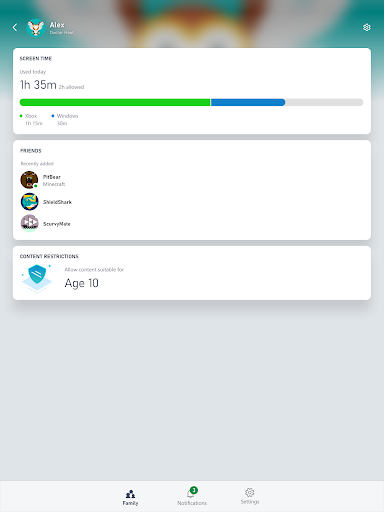
Microsoft's Xbox Family Settings app enters a crowded market of parental control software with a specific, platform-focused approach. Rather than attempting to manage a child's entire digital footprint across devices and operating systems, it concentrates on providing granular oversight for the Xbox console and Microsoft account ecosystem. This specialization can be a significant advantage for families deeply invested in Xbox gaming but may feel limited for those seeking broader device management. The app's core functionality revolves around three interconnected areas: screen time scheduling, content filtering, and purchase oversight. Parents can establish daily or weekly time allowances for console use, set boundaries for appropriate game ratings, and require approval for any spending from the child's account. A particularly useful feature is the 'Ask a Parent' function, which sends notification prompts to the parent's device when a child requests more time or seeks to play a game outside their age restrictions. This creates a negotiation loop without requiring physical proximity to the console. In real-world usage, the setup process is straightforward, linking parent and child Microsoft accounts. Day-to-day management is generally passive once rules are established, with the app serving as a dashboard for monitoring activity and responding to requests. The experience is most seamless when all parties are using Microsoft accounts for gaming and communication. Some users note that the app's utility is less about constant active management and more about setting clear, automated boundaries that the console enforces independently. As a relatively new and specialized offering, user feedback is still coalescing. Early adopters often praise the tight integration with the Xbox console itself, noting that rules set in the app are reliably enforced on the system. However, a common point of criticism is the app's narrow scope. Reviews indicate frustration from some parents who expect it to manage overall device screen time on phones or tablets, which it cannot do. The app's value is almost entirely contingent on Xbox console usage within the family. Ultimately, Xbox Family Settings is a competent, purpose-built tool that succeeds within its stated lane. It removes the need to navigate console menus to set controls and provides remote management capabilities. Its main limitation is its lack of ambition beyond the Microsoft gaming environment. For families where the Xbox is a primary entertainment hub, it is an essential download. For those seeking a comprehensive, cross-platform parental control suite, it will likely serve only as a supplemental tool.

Key Features

  • โ€ขScreen Time Schedules: Set daily or weekly time limits for console access, with the ability to designate specific time windows for play.
  • โ€ขContent Restrictions: Filter games and apps by age rating (ESRB) to prevent children from accessing inappropriate content.
  • โ€ขPurchase Approval: Require parental consent for any store purchases or subscription sign-ups made from the child's account.
  • โ€ขActivity Reporting: View weekly summaries of what games were played and for how long, providing insight into gaming habits.
  • โ€ข'Ask a Parent' Feature: Receive and respond to child requests for more time or to play a blocked game directly via phone notifications.
  • โ€ขFriend and Communication Controls: Manage who a child can add as a friend and their ability to communicate via voice or text.

Why Users Love It

Deep, reliable integration with Xbox consoles
Simplifies remote management of screen time rules

Perfect for: Perfect for parents with children who use Xbox consoles and want specific, enforceable controls over gaming time and content.

Screenshots
Xbox Family Settings screenshot 1Xbox Family Settings screenshot 2Xbox Family Settings screenshot 3Xbox Family Settings screenshot 4Xbox Family Settings screenshot 5Xbox Family Settings screenshot 6

Ranking History

Track Xbox Family Settings's performance in Lifestyle over the last 30 days

Top 5
Top 10
Top 15
Below 15

Current Rank

#45

โ†’

Best Rank

#45

All-time high

Average Rank

#45

30-day average

User Reviews

Tait Buie
โ˜…โ˜…โ˜…โ˜…โ˜…
Sep 11, 2025

Great apps for parents, so much easier to control screen time as well as limit certain apps or games. didn't get notifications at first but some fiddling around and i get them now.

Tait Buie
โ˜…โ˜…โ˜…โ˜…โ˜…
Sep 11, 2025

Great apps for parents, so much easier to control screen time as well as limit certain apps or games. didn't get notifications at first but some fiddling around and i get them now.

Tait Buie
โ˜…โ˜…โ˜…โ˜…โ˜…
Sep 11, 2025

Great apps for parents, so much easier to control screen time as well as limit certain apps or games. didn't get notifications at first but some fiddling around and i get them now.

Matias Mosqueira
โ˜…โ˜…โ˜…โ˜…โ˜…
Dec 25, 2025

up to now, and in comparison to Nintendo Switch, it is much better. I can control the starting and ending time, or just hours during the day in an easier and faster way.

Amanda Rowlings
โ˜…โ˜…โ˜…โ˜…โ˜…
Dec 16, 2025

I have complete control of my son's Xbox even the spending so that's nice. even control of cutting the Internet to it if it's time for bed.

App Details

Developer

Microsoft Corporation

Platform

android

Rating

โ˜…3.5

Last Updated

12/27/2025