Universal Smart TV Remote Ctrl icon
Universal Smart TV Remote Ctrl: One Remote to Rule Them All?

by Metaverse Labs

★4.3
ANDROIDHouse & Home
This app turns Android devices into universal controllers for smart TVs and streaming devices. Designed to help users consolidate multiple remotes, it supports infrared and Wi-Fi connectivity for broad compatibility. A practical solution for households with multiple entertainment systems.

Detailed Review

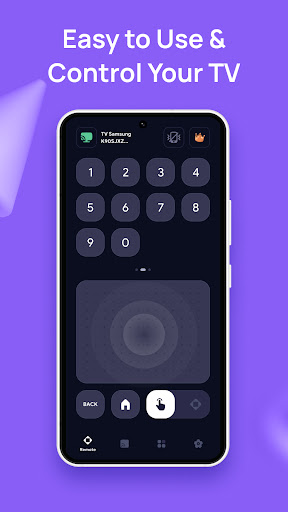
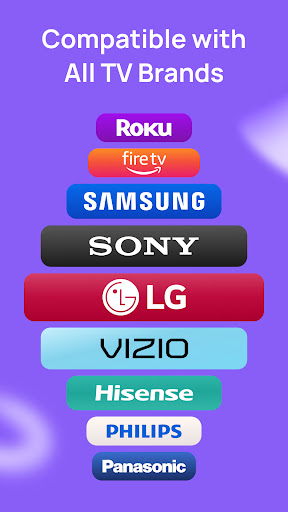
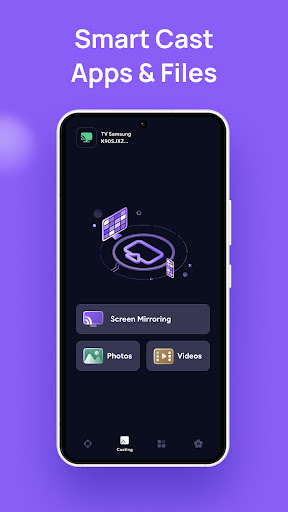
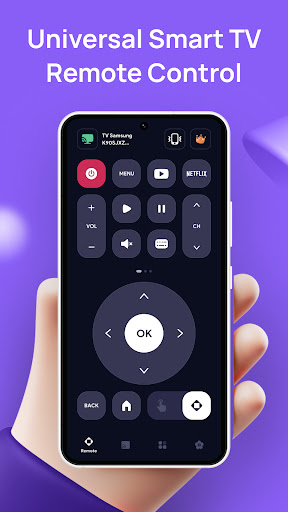
Universal Smart TV Remote Ctrl by Metaverse Labs enters a crowded market of remote control applications with a straightforward proposition: replacing physical remotes with smartphone convenience. The app positions itself as a comprehensive solution for controlling televisions, streaming sticks, and set-top boxes from major manufacturers like Samsung, LG, Sony, and Roku. Its dual-approach connectivity—supporting both IR-blaster capable devices and Wi-Fi connected systems—gives it broader compatibility than many single-method alternatives. The core functionality centers around device detection and customization. During setup, users select their device manufacturer and model from an extensive database, with fallback options for manual code entry when automatic recognition fails. The interface replicates traditional remote layouts with directional pads, number buttons, and dedicated streaming service shortcuts. Additional features include voice search implementation, a keyboard for text entry, and favorite channel presets. The app's sleep timer function proves particularly useful for bedtime viewing, automatically powering down devices after a set duration. Real-world usage reveals both strengths and limitations. In living room scenarios, the app successfully controls Samsung and LG televisions via IR, with responsive button feedback. The keyboard function streamlines search operations on Fire TV sticks, eliminating tedious on-screen typing. However, performance varies significantly with older television models and some budget streaming devices. Users report occasional connectivity drops with Wi-Fi controls, requiring app restarts. The interface, while functional, shows minor design inconsistencies between different device control screens. User feedback trends highlight reliability with mainstream devices but spotty performance with lesser-known brands. Positive reviews frequently mention the convenience of consolidating remotes and the keyboard functionality. Critical comments typically focus on specific device incompatibilities rather than fundamental app flaws. Some users note the advertisement-supported free version can feel intrusive during use, though the paid option removes this distraction. The lack of detailed setup guidance for non-technical users appears as a recurring minor complaint. Overall assessment finds Universal Smart TV Remote Ctrl delivers competent remote functionality for most common scenarios. Its value increases significantly for users with IR-capable Android devices and multiple entertainment systems. While not flawless in execution, the app provides tangible convenience benefits that justify its free tier, with the premium version offering reasonable value for frequent users. The developers maintain regular compatibility updates, though expanded device support would strengthen its universal claims.

Key Features

  • •Infrared and Wi-Fi connectivity supports both modern smart TVs and older television models without built-in wireless capabilities
  • •Manufacturer-specific remote layouts replicate physical remote designs for intuitive navigation and quick adaptation
  • •Voice search integration allows spoken commands for content discovery across supported streaming platforms and devices
  • •On-screen keyboard functionality simplifies text entry for search fields and login screens on connected entertainment systems
  • •Sleep timer settings automatically power down controlled devices after predetermined intervals for energy conservation
  • •Favorite channels customization enables single-tap access to preferred television stations and streaming service sections

Why Users Love It

Consolidates multiple remotes
Simplifies text entry

Perfect for: Households with multiple entertainment devices seeking remote consolidation

Screenshots
Universal Smart TV Remote Ctrl screenshot 1Universal Smart TV Remote Ctrl screenshot 2Universal Smart TV Remote Ctrl screenshot 3Universal Smart TV Remote Ctrl screenshot 4Universal Smart TV Remote Ctrl screenshot 5Universal Smart TV Remote Ctrl screenshot 6

Ranking History

Track Universal Smart TV Remote Ctrl's performance in House & Home over the last 30 days

Top 5
Top 10
Top 15
Below 15

Current Rank

#42

↓

7 from last week

Best Rank

#22

All-time high

Average Rank

#36

30-day average

User Reviews

John White
★★★★★
Oct 12, 2025

grateful for it i love this app it is the best thing to me right now my remote broken yesterday morning an i come across this today wonderful

John White
★★★★★
Oct 12, 2025

grateful for it i love this app it is the best thing to me right now my remote broken yesterday morning an i come across this today wonderful

John White
★★★★★
Oct 12, 2025

grateful for it i love this app it is the best thing to me right now my remote broken yesterday morning an i come across this today wonderful

John White
★★★★★
Oct 12, 2025

grateful for it i love this app it is the best thing to me right now my remote broken yesterday morning an i come across this today wonderful

John White
★★★★★
Oct 12, 2025

grateful for it i love this app it is the best thing to me right now my remote broken yesterday morning an i come across this today wonderful

App Details

Developer

Metaverse Labs

Platform

android

Rating

★4.3

Last Updated

11/1/2025