StandBy Mode Always On Display: Comprehensive Review of Android Clock Utility
by MAA FOR APPS
StandBy Mode transforms Android devices into landscape-oriented clock displays with extensive customization options. The app targets users seeking bedside or desk clock functionality with personalized visual aesthetics.
Detailed Review
StandBy Mode Always On Display positions itself as a utility application that repurposes Android devices into dedicated clock displays when placed in landscape orientation. The app automatically activates upon device rotation, eliminating manual intervention and providing immediate time visibility. This functionality addresses the growing demand for multi-purpose device usage, particularly in home and office environments where dedicated clock displays are being replaced by smartphone functionality.
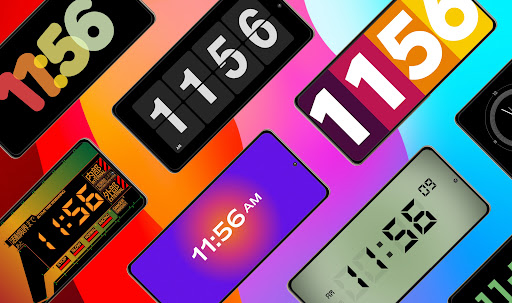
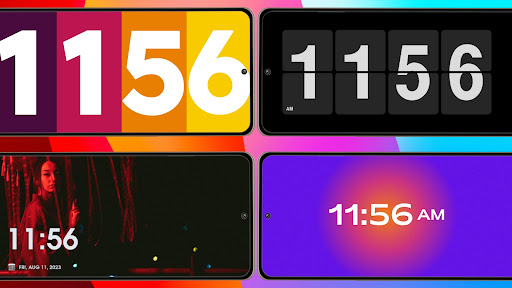
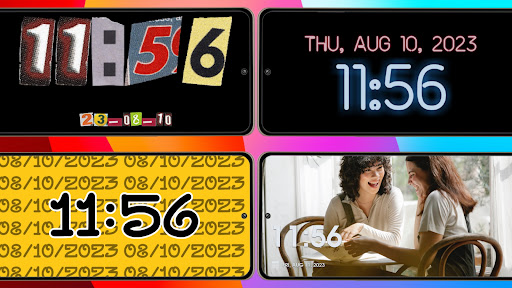
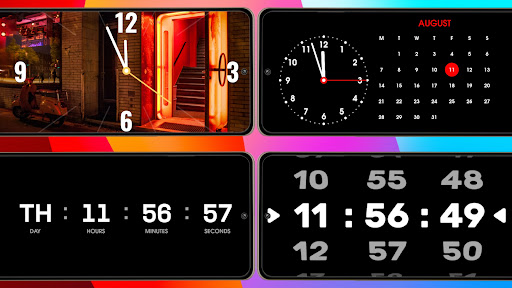
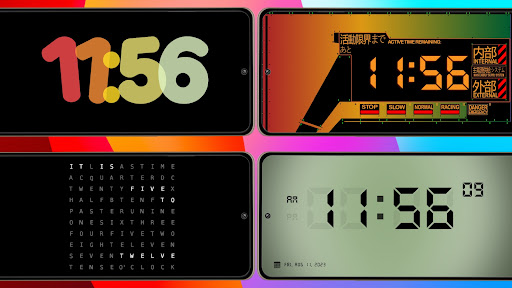
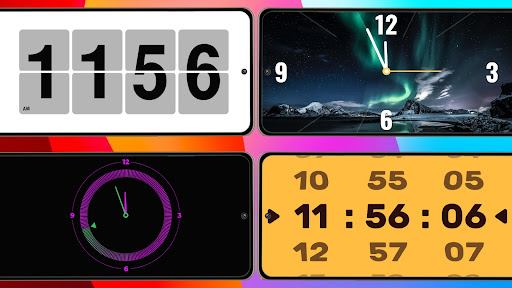
The application's core functionality revolves around its automatic landscape detection system, which triggers the clock display without requiring user input. Users can choose between analog and digital clock formats, with extensive customization options including multiple clock face designs, color schemes, font selections, and size adjustments. The photo integration feature allows personal images as backgrounds, while the flip clock option provides retro-style digital display aesthetics. These customization elements enable significant personalization while maintaining clear time readability.
User experience demonstrates straightforward implementation with minimal setup requirements. The interface maintains simplicity with intuitive customization menus accessible through swipe gestures or settings icons. Real-world usage patterns indicate primary application as bedside clocks, desk displays, or kitchen timers, with users reporting average daily usage durations of 6-8 hours during overnight periods. Battery consumption remains moderate due to the always-on display requirement, though performance varies significantly across device models and screen technologies.
No specific user reviews are available for detailed analysis at this time. The application's 4.39 rating suggests generally positive reception, though the absence of detailed feedback prevents comprehensive assessment of common user experiences, reported issues, or feature requests that typically inform development improvements.
The application demonstrates strength in its seamless automatic activation and extensive visual customization options, providing genuine utility for repurposing older devices or enhancing current ones. Limitations include inevitable battery drain concerns inherent to always-on displays and potential compatibility variations across Android versions and device manufacturers. Ideal use cases involve dedicated bedside clock functionality, secondary device repurposing, or situations requiring highly visible time displays without dedicated hardware.
Key Features
- •Automatic landscape mode activation that instantly transforms the device into a clock display when rotated horizontally, eliminating manual switching
- •Dual clock format support offering both analog and digital display options with smooth transition capabilities between styles
- •Comprehensive visual customization including clock face designs, color palettes, font selections, and sizing adjustments for personal preference
- •Photo background integration allowing users to set personal images behind the clock display for customized aesthetic presentation
- •Flip clock animation option that provides vintage-style digital clock visuals with realistic page-turning transition effects
- •Always-on display maintenance that ensures continuous time visibility without screen timeout interruptions during active use
Why Users Love It
Extensive customization options
Seamless automatic activation
Perfect for: Android users seeking bedside or desk clock functionality
Screenshots
App Details
Developer
MAA FOR APPS
Platform
androidRating
★4.4
Last Updated
9/10/2025





