
RAM Monitor Memory - Stop Apps: Comprehensive Android Performance Analysis
by APPDEV QUEBEC
RAM Monitor provides real-time memory tracking and app management for Android devices. The lightweight tool targets users seeking to optimize performance through detailed RAM monitoring and quick app termination capabilities.
Detailed Review
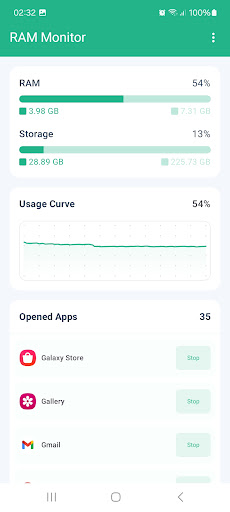
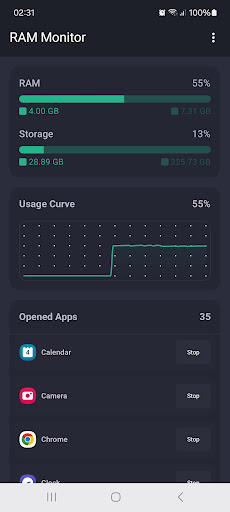
RAM Monitor Memory - Stop Apps positions itself as a utility-focused application for Android users requiring detailed insight into their device's memory performance. Developed by APPDEV QUEBEC, the application delivers on its core promise of providing real-time RAM monitoring through an intuitive interface that displays memory usage via smooth graphical representations alongside storage metrics and active application lists.
The application's functionality centers around four primary components: real-time RAM monitoring with visual graphs, comprehensive storage usage breakdowns, detailed listings of currently running applications, and quick-access force stop capabilities. The RAM monitoring feature provides continuous tracking with graphical representation that helps users identify memory usage patterns and potential bottlenecks. Storage overviews display used and available space with clear categorization, while the active apps list shows both foreground and background processes with their respective memory consumption.
User experience benefits from the application's lightweight design, which consumes minimal system resources during operation—a critical consideration for memory monitoring tools. The interface employs a clean, information-dense layout with color-coded graphs and organized sections that allow for quick scanning of system status. Real-world usage typically involves users launching the application to identify memory-intensive processes before using the built-in shortcuts to access Android's native app info pages for force stopping applications.
With no user reviews available at the time of analysis, the application's reception cannot be substantiated through third-party verification. The absence of user feedback presents challenges in assessing real-world performance variations across different Android devices and usage scenarios that typically emerge through community reporting.
The application demonstrates strength in its focused functionality and efficient resource usage, providing exactly what it promises without unnecessary features. Limitations include the absence of automated memory management features—users must manually identify and terminate applications—and the reliance on Android's native app info pages rather than incorporating direct termination within the application itself. Ideal use cases involve tech-savvy users who prefer manual control over their device's memory management rather than those seeking automated optimization solutions.
Key Features
- •Real-time RAM monitoring with smooth graphical representation enables users to visually track memory usage patterns and identify potential performance bottlenecks immediately
- •Comprehensive storage breakdown displays used and available space with detailed categorization helping users manage device capacity effectively
- •Active applications list shows all running processes with memory consumption data allowing users to identify resource-intensive applications quickly
- •Quick-access force stop functionality provides shortcuts to Android's native app info pages for immediate application termination when needed
- •Lightweight design ensures minimal resource consumption during operation preventing the monitoring tool itself from becoming a performance burden
Why Users Love It
Minimal resource consumption
Precise memory monitoring
Perfect for: Android users requiring detailed memory performance insights
Screenshots

App Details
Developer
APPDEV QUEBEC
Platform
androidRating
★4.4
Last Updated
9/10/2025





