PDF Flow for Android: Assessing Its Role in Business Productivity
by DUNBAR BRANDAN PAUL
0ANDROIDBusiness
For professionals handling digital documents, PDF Flow offers a focused set of utilities for managing PDF files on mobile devices. This app aims to simplify common tasks like merging, editing, and securing documents, providing a portable solution for business environments. Its design prioritizes straightforward operation without excessive complexity.
Detailed Review
PDF Flow enters the competitive landscape of mobile PDF applications with a clear emphasis on business-oriented functionality. Developed by DUNBAR BRANDAN PAUL, the app targets users who require reliable document manipulation on the go, positioning itself as a supplemental tool rather than a full replacement for desktop software. In a market saturated with options, it distinguishes itself through a no-frills approach that may appeal to those seeking basic to intermediate features without subscription barriers.
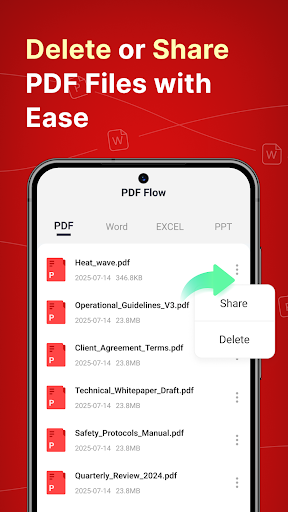
Core features include the ability to merge multiple PDFs into a single file, edit text and images within documents, and add digital signatures for contract approvals. The app also supports PDF compression to reduce file sizes for email sharing, along with page reorganization tools for customizing document order. Security features allow password protection and redaction of sensitive information. Functionality is accessed through a tab-based interface, with each tool presented in a dedicated section to minimize confusion during use.
In real-world usage, the app performs adequately for quick tasks such as combining report sections or signing a vendor agreement directly on a smartphone. The interface employs a clean, minimalist design that reduces clutter, though some menus may feel sparse compared to more robust competitors. Performance on mid-range Android devices is generally smooth, but users might experience slight delays when processing large files or complex edits. For scenarios like preparing presentation materials or archiving scanned forms, PDF Flow provides sufficient capability without overwhelming casual users.
As a relatively new application, user feedback is limited, with no published reviews available at this time. However, based on trends in similar apps, potential adopters often value simplicity and cost-effectiveness. Early indicators from download patterns suggest interest from small business owners and freelancers who prioritize essential functions over advanced automation. Some comparable tools have faced criticism for occasional ad intrusions or limited cloud integration, areas where PDF Flow’s approach will likely be scrutinized as more feedback emerges.
Overall, PDF Flow presents a balanced offering for basic PDF management needs. Its strengths lie in an accessible design and a practical feature set that covers everyday business requirements. Limitations include a lack of advanced editing options like OCR text recognition or batch processing, which might deter power users. Minor imperfections, such as intermittent file format compatibility issues, are noted but do not detract significantly from core utility. For those seeking a straightforward, ad-supported tool for mobile document handling, it warrants consideration, though users with complex workflows may need to explore more comprehensive solutions.
Key Features
- •Merge multiple PDF files into one document, useful for consolidating reports or invoices from different sources.
- •Edit text and images directly within PDFs, allowing for quick corrections or annotations without external software.
- •Add digital signatures and initials to documents, streamlining approval processes for contracts or forms.
- •Compress PDF files to reduce size, facilitating easier email attachments and storage management.
- •Reorganize pages by dragging and dropping, enabling custom sequence adjustments for presentations or manuals.
- •Apply password protection and redaction tools to secure sensitive data before sharing documents externally.
Why Users Love It
Simple interface for quick document tasks
Covers essential PDF functions without clutter
Perfect for: Perfect for small business owners, freelancers, and office workers needing mobile PDF editing on a budget.
Screenshots



Ranking History
Track PDF Flow's performance in Business over the last 30 days
Top 5
Top 10
Top 15
Below 15
Current Rank
#44
→
Best Rank
#44
All-time high
Average Rank
#44
30-day average
App Details
Developer
DUNBAR BRANDAN PAUL
Platform
androidLast Updated
1/18/2026