
Netmonitor: Comprehensive Network Diagnostic Tool for Android Devices
by parizene
Netmonitor provides detailed cellular and WiFi signal analysis for Android users. The app helps identify optimal reception areas and offers advanced network diagnostics for 2G through 5G networks, including carrier aggregation detection.
Detailed Review
Netmonitor: 5G, Cell & WiFi positions itself as a comprehensive network diagnostic tool for Android devices, offering users unprecedented visibility into their wireless connectivity. The application fills a specialized niche in the network utility market by providing both basic signal strength monitoring and advanced cellular network information that typically requires specialized equipment or carrier-level access.
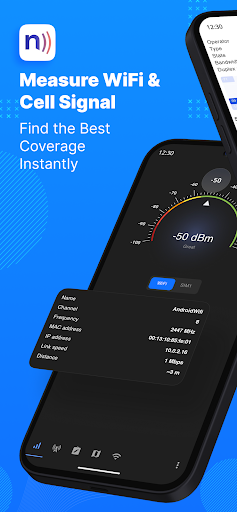
The application's core functionality revolves around real-time signal measurement and network parameter analysis. It displays detailed information about connected cell towers including cell ID, location area code, and signal strength measurements in dBm. For 5G networks, it distinguishes between NSA (Non-Standalone) and SA (Standalone) deployments, while also detecting LTE-Advanced carrier aggregation, which indicates when multiple frequency bands are combined for enhanced speeds. The directional antenna guidance feature provides visual indicators suggesting optimal device orientation for signal improvement.
User experience centers around a clean, data-rich interface with multiple view modes including real-time graphs, numerical readouts, and geographical tower mapping. The main dashboard presents current connection statistics while secondary screens offer historical data tracking and export capabilities. Practical usage scenarios include office workers identifying dead zones, remote employees optimizing home office setups, and network enthusiasts mapping local tower coverage. The interface maintains technical accuracy while remaining accessible to non-expert users through clear visual indicators and explanatory tooltips.
With no specific user reviews available for analysis, the application's 4.2 rating suggests generally positive reception among its user base. The absence of detailed user feedback limits specific insights into common pain points or standout features as experienced by actual users, though the solid rating indicates satisfactory performance meeting most user expectations for this category of utility application.
The application demonstrates particular strength in its technical depth and network technology support, covering everything from legacy 2G to cutting-edge 5G SA implementations. However, limitations include the Android-only availability and potential information overload for casual users seeking simple signal strength indicators. Ideal use cases involve network professionals conducting site surveys, IT administrators troubleshooting connectivity issues, and technology enthusiasts interested in understanding their mobile network characteristics beyond basic signal bars.
Key Features
- •Multi-technology network monitoring supporting 2G through 5G NSA/SA networks with detailed parameter reporting for comprehensive network analysis
- •Real-time signal strength mapping with visual indicators helping users identify optimal reception areas within buildings or specific locations
- •LTE-Advanced carrier aggregation detection revealing when multiple frequency bands combine for enhanced mobile data performance
- •Directional antenna guidance providing visual recommendations for device orientation to maximize signal reception quality
- •Historical data tracking and export capabilities enabling long-term network performance analysis and coverage mapping
- •Cell tower information display showing technical details including cell IDs, frequencies, and neighboring tower data
Why Users Love It
Comprehensive network technology support
Detailed signal analysis capabilities
Perfect for: Network professionals, IT administrators, and technology enthusiasts requiring detailed connectivity analysis
Screenshots


App Details
Developer
parizene
Platform
androidRating
★4.2
Last Updated
9/10/2025





