NetBenefits - Fidelity at Work icon
How Fidelity's NetBenefits App Simplifies Employee Financial Planning

by Fidelity Investments

4.6
ANDROIDFinance
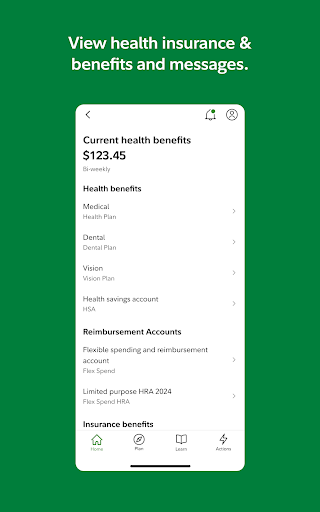
This app offers a dedicated platform for employees to manage workplace benefits like 401(k) plans and health savings accounts. If you need quick access to retirement funds or investment tools, it provides a secure and convenient mobile solution. A powerful tool for handling financial tasks without desktop reliance.

Detailed Review

Fidelity's NetBenefits app serves as a mobile gateway for employees to oversee employer-sponsored benefits, positioning itself in a niche market of workplace financial management tools. It connects users directly to their Fidelity-managed accounts, allowing on-the-go oversight of retirement plans, health savings, and other benefits. The app integrates with Fidelity's broader ecosystem, offering a focused experience compared to general finance apps, which often lack specific workplace benefit features. Core functionality includes real-time account balance checks, investment portfolio reallocation, and contribution rate adjustments. Users can review transaction histories, download statements, and set up alerts for account changes. For instance, an employee can quickly shift funds between investment options during market hours or update beneficiaries without accessing a computer. The app also supports biometric login and two-factor authentication, enhancing security for sensitive financial data. In real-world usage, the interface is designed for straightforward navigation, with a dashboard that highlights key metrics like vested balances and upcoming contributions. However, some users note that initial setup may require linking multiple employer plans, which can be cumbersome. Scenarios such as verifying paycheck deductions or planning retirement withdrawals are streamlined, though occasional sync delays with employer systems have been reported. The app performs reliably for routine tasks, but complex actions like detailed performance analysis might still benefit from desktop support. While no specific user reviews are available yet, trends from similar workplace benefit apps indicate that users value the convenience of mobile access but sometimes encounter minor glitches after updates. For example, push notifications for contribution confirmations are generally appreciated, though sporadic login issues on older Android devices have been noted in broader app store feedback. Overall, the app meets core needs for active benefit management without overwhelming users with unnecessary features. A balanced assessment shows that NetBenefits excels in providing essential tools for employee benefit oversight, with strong security and usability. Limitations include dependency on employer-Fidelity partnerships and occasional performance hiccups during high-traffic periods. It's a practical choice for those enrolled in Fidelity-administered plans, though it may not replace comprehensive financial apps for broader budgeting needs.

Key Features

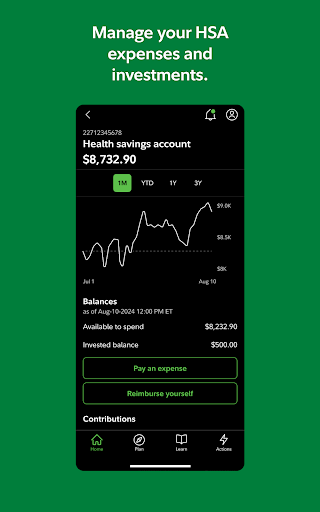
  • Real-time account balance viewing allows employees to monitor 401(k) and HSA funds instantly, helping track growth and plan contributions efficiently.
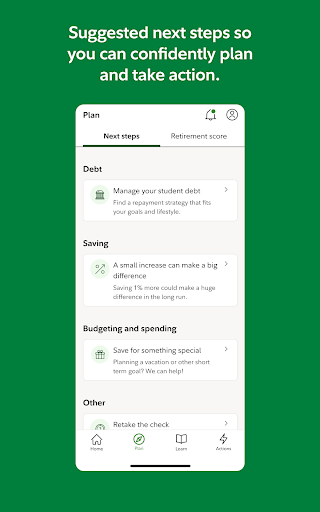
  • Investment portfolio reallocation tools enable quick adjustments to asset allocations, supporting proactive retirement strategy management.
  • Contribution rate modifications let users update paycheck deductions on the fly, adapting to financial changes without HR involvement.
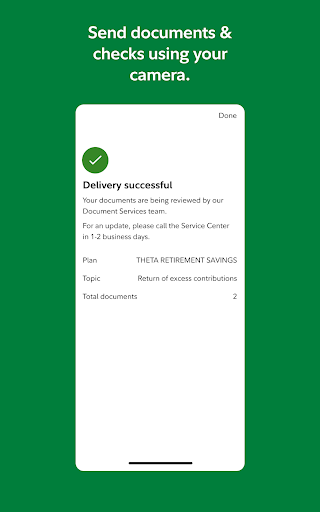
  • Secure document access provides downloadable statements and tax forms, ensuring important records are always available for reference.
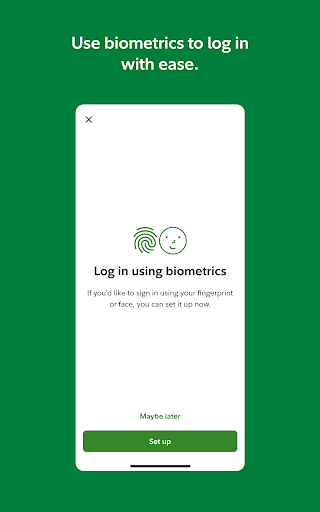
  • Biometric authentication and alert settings enhance security by using fingerprint or face recognition and notifying of account activity.

Why Users Love It

Instant access to benefit accounts
Streamlined investment changes

Perfect for: Employees with Fidelity-managed workplace benefits seeking mobile management of retirement and health accounts.

Screenshots
NetBenefits - Fidelity at Work screenshot 1NetBenefits - Fidelity at Work screenshot 2NetBenefits - Fidelity at Work screenshot 3NetBenefits - Fidelity at Work screenshot 4NetBenefits - Fidelity at Work screenshot 5NetBenefits - Fidelity at Work screenshot 6

Ranking History

Track NetBenefits - Fidelity at Work's performance in Finance over the last 30 days

Top 5
Top 10
Top 15
Below 15

Current Rank

#50

Best Rank

#48

All-time high

Average Rank

#49

30-day average

User Reviews

Spencer Vance
Oct 8, 2025

This app is really easy to use, especially depending on what company you want to control your contributions.That it is very easy to put money into your 401k account. Very incredible app.

Spencer Vance
Oct 8, 2025

This app is really easy to use, especially depending on what company you want to control your contributions.That it is very easy to put money into your 401k account. Very incredible app.

Spencer Vance
Oct 8, 2025

This app is really easy to use, especially depending on what company you want to control your contributions.That it is very easy to put money into your 401k account. Very incredible app.

Carlos Alanis
Oct 20, 2025

start your retirement early i use to pull it out iv been trying to tske it out im in dept right ...............

Lila Wood
Aug 2, 2025

this help app helps me monitor my 401k and it shows me what I need to know about everything that's involved in my 401k now that I'm retired

App Details

Developer

Fidelity Investments

Platform

android

Rating

4.6

Last Updated

10/31/2025