
Memory Cleaner: Technical Analysis of Android RAM Optimization Utility
by 奇谈君
Memory Cleaner employs aggressive RAM management by forcing background app termination through memory occupation. This Android utility targets users experiencing performance issues due to memory constraints on older or heavily loaded devices.
Detailed Review
Memory Cleaner presents an unconventional approach to Android memory management by implementing what its developer describes as a 'fight poison with poison' methodology. The application works by deliberately occupying device memory to trigger the system's native process-killing mechanisms, thereby forcing the closure of background applications before releasing the occupied memory itself. This technique differs fundamentally from conventional memory cleaners that simply clear cache files or suggest closing apps manually.
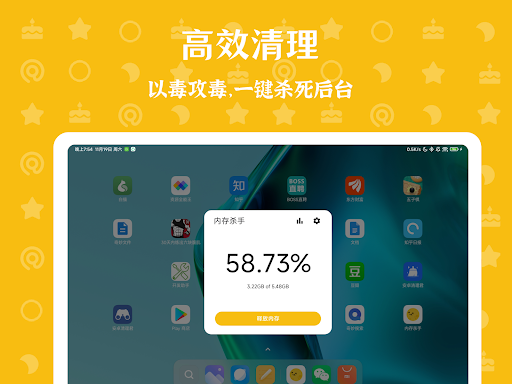
The core functionality revolves around a single-tap cleaning process that temporarily allocates substantial memory resources, pushing the Android system to aggressively terminate background processes according to its built-in memory management hierarchy. The application operates without requiring root access, leveraging standard Android APIs to execute its memory allocation strategy. Users receive visual feedback through memory usage graphs showing before-and-after statistics, though the interface lacks advanced configuration options or scheduling capabilities for automated cleaning operations.
User experience centers on minimalistic interaction with a primary cleaning button dominating the interface. The application displays real-time memory statistics and provides basic educational information about Android memory management. During operation, users may notice temporary device heating as noted in the developer's warnings, which occurs during the memory allocation phase. The cleaning process typically completes within 10-15 seconds, after which the application automatically releases occupied memory and returns the device to normal operation.
No substantive user reviews are currently available for analysis, making comprehensive assessment of real-world performance challenging. The developer's documentation acknowledges that effectiveness may vary significantly across device manufacturers and Android versions, particularly noting potential incompatibility with certain manufacturer-specific memory management implementations that might resist the application's forced cleaning methodology.
The application demonstrates technical innovation in its approach to memory management but faces significant limitations regarding consistent cross-device performance. While potentially beneficial for older devices with limited RAM struggling with background process accumulation, its effectiveness remains unpredictable across the fragmented Android ecosystem. The approach carries inherent risks of increased battery consumption during operation and potential conflicts with manufacturer-optimized memory management systems, though the developer asserts no permanent device damage occurs.
Key Features
- •Aggressive memory occupation technique forces Android system to terminate background processes through native memory management triggers
- •Single-tap operation requires minimal user interaction while providing immediate visual feedback through memory usage statistics
- •Root-free implementation works on standard Android installations without requiring elevated system privileges or custom modifications
- •Automatic memory release ensures occupied RAM is freed after cleaning process completes without requiring manual intervention
- •Real-time memory monitoring displays current usage statistics and visual representation of memory allocation changes
- •Lightweight installation maintains small storage footprint while avoiding persistent background services that consume resources
Why Users Love It
Non-root memory management
Minimal user interaction required
Perfect for: Android users experiencing performance issues on memory-constrained devices
Screenshots





App Details
Developer
奇谈君
Platform
androidRating
★4.5
Last Updated
9/10/2025





