
Lock Screen App Analysis: Minimalist Android Utility Review
by olalab
Lock Screen by olalab provides Android users with a lightweight alternative to physical power button locking. The 72KB app offers instant screen locking without advertisements, targeting users seeking hardware button preservation.
Detailed Review
Lock Screen by developer olalab represents a minimalist approach to Android utility applications, focusing exclusively on providing an alternative screen locking mechanism to the physical power button. The app occupies an exceptionally small footprint at under 72KB, positioning itself as one of the most lightweight solutions available in the Google Play Store for this specific functionality. Its market position remains niche, catering to users who prioritize system resource conservation over feature-rich alternatives.
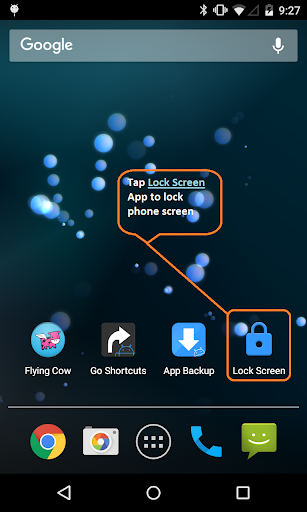
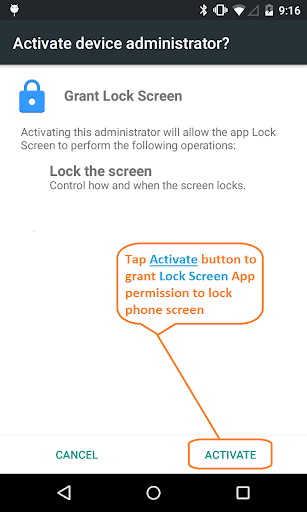
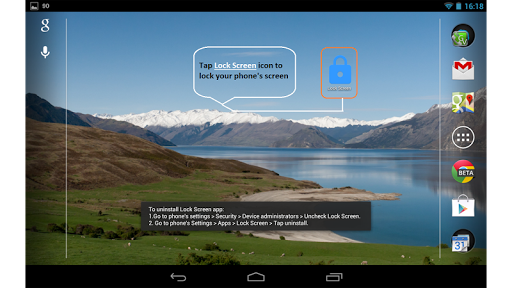
The core functionality revolves around a single-tap locking mechanism that immediately secures the device screen. The application requires device administrator permissions to perform its locking function, following standard Android security protocols. Unlike more comprehensive locker applications, this utility lacks additional features such as customization options, notification controls, or biometric integration. The installation process follows conventional Android procedures, though uninstallation requires a specific two-step process involving device administrator deactivation before standard removal.
User experience centers on a spartan interface consisting primarily of a single activation button. The application launches instantly due to its minimal size, with no noticeable loading times or performance impacts on standard Android devices. Real-world usage patterns suggest primary utility for users with physically compromised power buttons or those seeking to reduce mechanical wear on hardware components. The absence of background processes or memory-intensive operations makes it suitable for low-specification devices where resource allocation remains critical.
With no user reviews available at the time of analysis, the application's reception cannot be quantitatively assessed. The 3.8-star rating suggests moderate acceptance within its limited user base, though the absence of detailed feedback prevents comprehensive analysis of common user experiences, reported issues, or satisfaction trends that typically inform application assessments.
The application's primary strength lies in its extreme lightweight design and focused functionality, though this simultaneously represents its main limitation through feature absence. Ideal use cases include secondary devices where basic locking functionality suffices, or for users experiencing power button failure who require temporary software alternatives. The absence of advertisements represents a significant advantage over many free utilities, though the lack of updates or visible developer engagement may concern users seeking long-term support.
Key Features
- •Instant one-tap screen locking that immediately secures the device without physical button interaction
- •Minimal 72KB installation size that consumes negligible storage space and system resources
- •Zero advertisement implementation throughout the application interface and functionality
- •Device administrator integration that follows Android's security protocols for legitimate locking
- •Simple interface design focused exclusively on core locking functionality without distractions
Why Users Love It
Extremely lightweight footprint
No advertisements present
Perfect for: Android users seeking power button alternatives
Screenshots

App Details
Developer
olalab
Platform
androidRating
★3.8
Last Updated
9/10/2025





