Happ - Proxy Utility icon
Happ App Review: A Streamlined Proxy Client for Android

by HappDev

4.4
ANDROIDTools
If you need a straightforward and reliable way to manage proxy configurations on an Android device, Happ - Proxy Utility presents a capable option. Designed to help users handle various proxy subscription formats, this tool focuses on core functionality with a clear information display. A solid choice for those prioritizing connection stability and essential subscription metrics.

Detailed Review

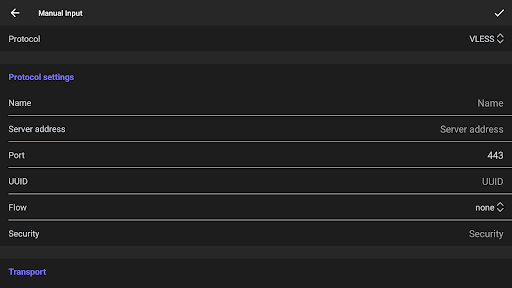
In the crowded space of Android proxy and VPN clients, Happ - Proxy Utility by HappDev distinguishes itself through a pragmatic focus on core connectivity. The app serves as a client for managing proxy server configurations, supporting common subscription formats to simplify the process of establishing secure connections. Its position in the market is that of a utility-first tool, appealing to users who value function over extensive feature lists or complex settings menus. Analyzing its core features reveals a focus on essential functionality. The application allows users to import and manage multiple server configurations from subscription links. A key operational feature is the built-in connection tester, which provides real-time latency (ping) data for each server. Perhaps most notably, the app surface's user-centric data panels clearly display remaining data quota, expiry dates, and connection status, which eliminates the need to dig through menus for this critical information. This approach to surfacing subscription data directly on the main screen addresses a common frustration with similar utilities. In real-world usage, the app provides a relatively frictionless experience for connecting to a preferred server. The interface, while functional, follows a utilitarian design philosophy. Users can typically import a configuration and be connected within a few taps. However, a practical scenario noted in reviews involves accessing local websites while the proxy is active; some users report that local sites fail to load until the connection is disabled and the browser is refreshed, suggesting the app's routing could be more nuanced for split-tunneling scenarios. This is a specific consideration for users who frequently switch between local and international content. User feedback trends heavily toward praise for connection reliability and the clear data display, with a consistent thread of requests for interface and sorting improvements. Multiple reviews specifically and repeatedly ask for a configuration sorting option based on TCPING speed, highlighting a desire for quicker access to the optimal server. Another common suggestion involves visual refinements, such as using color-coded ping times and gradient data usage bars for faster comprehension. These reviews indicate a user base that is highly engaged and appreciative of the app's core stability but sees clear avenues for enhanced usability. Overall, Happ - Proxy Utility earns its strong 4.4-star rating through reliable performance in its primary task: establishing and maintaining proxy connections. Its major strengths are stability and the excellent visibility it provides into subscription details. The limitations are primarily in user experience polish and advanced routing controls. For users whose priority is a no-fuss, dependable client that makes subscription management transparent, it represents a compelling option, albeit one that could benefit from incorporating the sorting and UI enhancements its community actively requests.

Key Features

  • Clear Subscription Dashboard: Displays remaining data, expiry date, and active connection status prominently on the main screen, removing the need to navigate sub-menus for vital account information.
  • Multi-Format Configuration Support: Imports and manages proxy server configurations from various subscription link formats, centralizing server lists within a single application.
  • Built-in Connection Testing: Features an integrated latency tester (TCPING) for each server configuration, allowing users to check response times before connecting.
  • One-Tap Server Connection: Enables quick connection and disconnection to any configured server directly from the primary list view, streamlining the process.
  • Subscription Management: Handles updates for configuration links, helping to keep server lists current without requiring manual re-entry of details.

Why Users Love It

Reliable connection stability
Transparent subscription data display

Perfect for: Perfect for Android users who need a straightforward, reliable client to manage and connect to proxy server subscriptions.

Screenshots

Happ - Proxy Utility screenshot 1Happ - Proxy Utility screenshot 2Happ - Proxy Utility screenshot 3Happ - Proxy Utility screenshot 4Happ - Proxy Utility screenshot 5Happ - Proxy Utility screenshot 6

Ranking History

Track Happ - Proxy Utility's performance in Tools over the last 30 days

Top 5
Top 10
Top 15
Below 15

Current Rank

#49

Best Rank

#44

All-time high

Average Rank

#47

30-day average

User Reviews

Arman Erfan
Aug 1, 2025

Please consider adding an option to sort the configurations by TCPING speed in a future update. This would allow users to easily see and connect to the fastest server directly from the main screen. It would greatly improve usability and save time when choosing the best configuration.

Arman Erfan
Aug 1, 2025

Please consider adding an option to sort the configurations by TCPING speed in a future update. This would allow users to easily see and connect to the fastest server directly from the main screen. It would greatly improve usability and save time when choosing the best configuration.

Arman Erfan
Aug 1, 2025

Please consider adding an option to sort the configurations by TCPING speed in a future update. This would allow users to easily see and connect to the fastest server directly from the main screen. It would greatly improve usability and save time when choosing the best configuration.

Mohammad Javad Ebrahimi
Jul 29, 2025

This app is very useful and well-designed. I especially like how it displays user information such as data usage, expiry date, and more directly on the screen - it's very convenient. However, the UI could use a bit of improvement. It would be great if the font color for delays (ping times) was green, and the data usage bar used a gradient color - starting with a pleasant green and turning red as the quota is nearly used up. Also, the "Check current connection" link is placed too close to the s

Mohammad Javad Ebrahimi
Jul 29, 2025

This app is very useful and well-designed. I especially like how it displays user information such as data usage, expiry date, and more directly on the screen - it's very convenient. However, the UI could use a bit of improvement. It would be great if the font color for delays (ping times) was green, and the data usage bar used a gradient color - starting with a pleasant green and turning red as the quota is nearly used up. Also, the "Check current connection" link is placed too close to the s

App Details

Developer

HappDev

Platform

android

Rating

4.4

Last Updated

1/10/2026