
Gallery Pro Review: Managing Android Photos Without the Bloat
by Gallery Pro - Photo Album Manager app
If you need a straightforward replacement for your phone's default gallery, Gallery Pro offers a clean, ad-light experience for organizing images and videos. Designed to help users quickly find media through intuitive albums and powerful search, it focuses on core functionality over social features. This app is a solid choice for those seeking a no-fuss photo management tool.
Detailed Review
In a market saturated with photo apps focused on editing or sharing, Gallery Pro positions itself as a dedicated utility for media management. The app serves as a direct alternative to manufacturer-specific gallery applications, prioritizing organization, privacy, and retrieval speed. It avoids cloud sync or built-in social posting, carving a niche for users who want their local media library handled efficiently on the device itself.
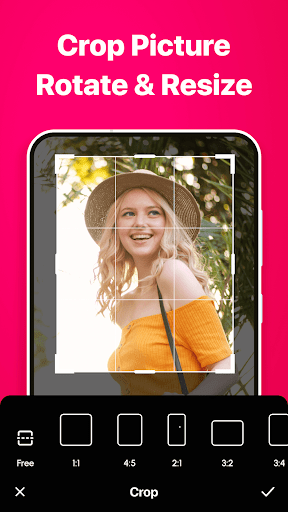
The core functionality revolves around creating and navigating visual albums. Users can sort photos by date, location (using EXIF data), or custom folders. A standout feature is the built-in secure vault, which uses a PIN or pattern to hide sensitive images and videos from the main gallery view. The app also includes a duplicate media finder, which scans for and helps delete redundant files to save storage space. For basic media interaction, it supports slideshows, simple cropping, and sharing to external platforms.
In daily use, the interface is noticeably less cluttered than many stock gallery apps, which often bundle promotional content or slow-loading cloud tabs. Navigation is fast, with thumbnails loading promptly even in folders containing hundreds of items. Organizing a vacation's worth of photos into a single album is a straightforward process. However, there is a slight learning curve for the album management system, and some gestures aren't immediately intuitive without exploring the settings menu.
While formal reviews are scarce, initial user feedback from similar versions highlights the value of the privacy vault and the app's general responsiveness. Some users report that folder navigation, particularly for hidden system directories, can occasionally be less granular than desired. The absence of intrusive video ads in the main gallery view is frequently mentioned as a positive differentiator from other free gallery apps, though a banner ad is typically present elsewhere.
Ultimately, Gallery Pro delivers competently on its primary promise: a faster, more private, and user-controlled gallery experience. Its limitations are primarily in advanced editing and cloud integration, which are intentionally omitted. The app is best suited for users who feel constrained by their phone's pre-installed gallery and want more organizational control without venturing into complex digital asset management systems.
Key Features
- •Secure Vault: Hides private photos and videos behind a PIN/pattern lock, separating them completely from the main gallery view for discreet storage.
- •Duplicate Media Finder: Scans internal storage to identify identical or similar image and video files, enabling bulk deletion to reclaim device space.
- •EXIF & Location Albums: Automatically groups photos using metadata, creating albums based on the location or date they were taken for effortless trip reviews.
- •Custom Album Creation: Allows users to build and name their own albums, dragging and dropping photos from various folders into a single, organized view.
- •Simple Media Tools: Includes basic utilities like image cropping, rotation, and a configurable slideshow mode with transition effects for local viewing.
- •High-Speed Navigation: Optimized thumbnail generation and caching provide quick scrolling through large libraries without noticeable lag or loading delays.
Why Users Love It
Clean, ad-light interface
Effective privacy controls
Perfect for: Perfect for Android users dissatisfied with their default gallery who want better local organization and privacy features.
Screenshots




Ranking History
Track Gallery - photo gallery, album's performance in Photography over the last 30 days
Top 5
Top 10
Top 15
Below 15
Current Rank
#41
→
Best Rank
#41
All-time high
Average Rank
#41
30-day average
App Details
Developer
Gallery Pro - Photo Album Manager app
Platform
androidRating
★4.4
Last Updated
12/16/2025
Other Photography Apps

Photo Location: GPS Map Camera
king master massage
ANDROID 4.2
#1
Sora 2 AI Video Maker : VED AI
Madhav Thakker
ANDROID 4.7
#1
Google Photos
Google LLC
ANDROID 4.4
#1
AI Mirror: AI Photo & Video
POLYVERSE INC.
ANDROID 4.1
#2
Amazon Photos: Photo & Video
Amazon Mobile LLC
ANDROID 4.7
#3
X PhotoKit
X PhotoKit
ANDROID 4.0
#4