
Fonts App Keyboard & Changer: Comprehensive Typography Customization Review
by Pixster Studio
Fonts App Keyboard & Changer provides Android users extensive font customization for social media profiles and messaging. The application targets content creators seeking distinctive text styling across platforms like Instagram and messaging services.
Detailed Review
Fonts App Keyboard & Changer by Pixster Studio positions itself as a comprehensive typography customization tool for Android devices, specifically targeting social media enthusiasts and content creators. The application serves as both a standalone font generator and an integrated keyboard solution, enabling users to apply specialized fonts across various platforms including Instagram bios, messaging applications, and social media posts.
The core functionality revolves around two primary components: a font library containing numerous stylistic typefaces and an integrated keyboard system called gbox. Users can browse through categorized font collections including bold, fancy, and decorative styles, then apply these directly through the custom keyboard interface. The application operates by copying formatted text to the clipboard or enabling the custom keyboard within Android's input methods, requiring typical permissions for keyboard functionality and clipboard access.
User experience follows a straightforward pattern: selection of desired fonts from the catalog, preview of text samples, and implementation through either copy-paste methodology or direct keyboard input. The interface employs a card-based design with clear categorization, though some users might find the advertisement frequency disruptive to the browsing experience. Real-world usage typically involves quick font selection for social media profile updates or creating standout messages in communication apps where standard fonts dominate.
With no specific user reviews available for reference, the application's 4.15-star rating suggests generally positive reception, though the absence of detailed feedback makes specific user sentiment difficult to ascertain. Typically, such applications receive praise for expanding creative options while sometimes facing criticism regarding implementation complexity or advertisement presence within free versions.
The application demonstrates clear strengths in font variety and social media integration, though limitations include the requirement to enable third-party keyboards and potential learning curve for less technically-inclined users. It serves best as a niche tool for social media managers, influencers, and users seeking to differentiate their digital text presentation beyond platform-default options.
Key Features
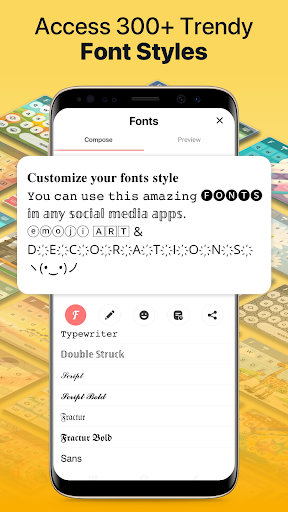
- •Extensive font library containing hundreds of specialized typefaces including bold, decorative, and fancy styles for diverse text customization needs
- •Integrated gbox keyboard functionality that replaces standard keyboard with font-enabled typing across all applications and platforms
- •Instagram-specific optimization allowing direct styling of profile bios and posts without external text generators or conversion tools
- •Real-time text preview system that displays selected fonts applied to user-input text before implementation or copying
- •One-tap copy functionality that automatically formats and places styled text in clipboard for pasting into target applications
- •Categorized font browsing with search functionality and favorite tagging for quick access to frequently used typefaces
Why Users Love It
Extensive font variety
Social media integration
Perfect for: Social media users seeking distinctive text styling
Screenshots


App Details
Developer
Pixster Studio
Platform
androidRating
★4.2
Last Updated
9/10/2025





