Filmora AI: AI Video Generator icon
Filmora AI Video Generator: A Hands-On Review of Wondershare's New Tool

by Wondershare Filmora

This app positions itself as a streamlined solution for turning ideas into videos using automated tools. Aimed at social media creators and marketers, it offers template-driven editing and AI-assisted media generation. However, its current user rating suggests the experience may be inconsistent.

Detailed Review

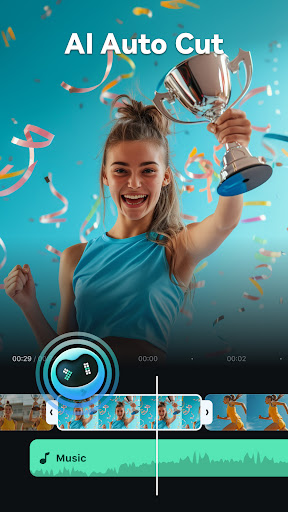
Wondershare's Filmora AI enters a crowded market of mobile video editors, distinguishing itself with a focus on generative tools designed to simplify the initial creation process. The app functions less as a traditional editor and more as a starting point for users who may lack footage or editing time, providing a bridge between a concept and a shareable video draft. Its integration with the broader Filmora ecosystem is a clear strategic move to capture users early in the creative workflow. The core functionality revolves around several AI-powered actions. Users can start from text prompts or a voice recording, which the app then interprets to match with stock media and apply a coherent edit. A library of templates tailored for platforms like TikTok and Instagram provides structured frameworks. The tool also includes object erasure and background generation features, common in desktop editors but less frequent in mobile-first applications. These features are structured to minimize manual timeline editing, favoring a more guided, step-by-step assembly process. In practical use, the app is best suited for quick-turnaround, short-form content. A small business owner could describe a product promotion, and the app would assemble a 15-second clip with relevant B-roll and text overlays. A travel blogger might narrate a trip highlight and receive a compiled sequence of scenic shots. The interface is generally clean, though some menu labels can be ambiguous, leading to occasional trial-and-error navigation. Performance is largely dependent on the device and connection speed, particularly for AI rendering tasks. With no published reviews available, the 3.4-star aggregate rating becomes the primary user feedback metric. This score typically indicates functional promise tempered by technical bugs, subscription model frustrations, or output quality that doesn't meet expectations. Common issues in similar apps include watermarks on free-tier exports, limited customization within AI-generated videos, and longer-than-anticipated processing times. Potential users should anticipate possible instability, as is common with newly launched apps specializing in processor-intensive tasks. Ultimately, Filmora AI presents a specialized tool for a specific need: rapid video prototyping. Its strengths lie in concept visualization and template-based design, making it a potential time-saver for certain creators. Its limitations appear to be reflected in its middling rating, likely relating to the polish and flexibility of its output. It serves as a supplemental tool rather than a full replacement for a comprehensive editing suite.

Key Features

  • Text-to-Video AI: Converts written prompts or articles into draft video edits by automatically pairing narrative with stock visuals and music.
  • Voice-to-Video Generator: Records or uploads a voiceover, then synchronizes video clips, images, and captions to the audio timeline.
  • Template-Driven Editing: Offers pre-designed, platform-specific templates for Reels, Shorts, and TikTok to standardize format and style.
  • AI Object Eraser: Removes unwanted elements from video frames using contextual fill tools, similar to photo-editing capabilities.
  • AI Background Generator: Replaces existing video backgrounds with new scenes or effects based on text descriptions.
  • Media Asset Library: Provides access to a curated collection of stock videos, images, and audio tracks for use within generated projects.

Why Users Love It

Accelerates initial video draft creation
Useful for script-first content workflows

Perfect for: Social media managers and content creators needing to produce high volumes of short-form video quickly, with less emphasis on fine-grained manual control.

Screenshots

Filmora AI: AI Video Generator screenshot 1Filmora AI: AI Video Generator screenshot 2Filmora AI: AI Video Generator screenshot 3Filmora AI: AI Video Generator screenshot 4Filmora AI: AI Video Generator screenshot 5Filmora AI: AI Video Generator screenshot 6

Ranking History

Track Filmora AI: AI Video Generator's performance in Video Players & Editors over the last 30 days

Top 5
Top 10
Top 15
Below 15

Current Rank

#42

Best Rank

#42

All-time high

Average Rank

#42

30-day average

User Reviews

Luke Goodman
Jan 6, 2026

Big help In perfecting my social media reels! worth the $40 for someone with no editing experience and limited time to experiment with it.

Luke Goodman
Jan 6, 2026

Big help In perfecting my social media reels! worth the $40 for someone with no editing experience and limited time to experiment with it.

Luke Goodman
Jan 6, 2026

Big help In perfecting my social media reels! worth the $40 for someone with no editing experience and limited time to experiment with it.

Luke Goodman
Jan 6, 2026

Big help In perfecting my social media reels! worth the $40 for someone with no editing experience and limited time to experiment with it.

Luke Goodman
Jan 6, 2026

Big help In perfecting my social media reels! worth the $40 for someone with no editing experience and limited time to experiment with it.

App Details

Developer

Wondershare Filmora

Platform

android

Rating

3.4

Last Updated

1/19/2026