
Dust Cleaner: Comprehensive Analysis of Android Storage Optimization Utility
by World Leading Job Provider
Dust Cleaner is an Android utility application designed to optimize device storage through junk file cleaning, app management, and large file organization. The tool targets users seeking to reclaim storage space and maintain device performance through systematic file management.
Detailed Review
Dust Cleaner positions itself as a comprehensive Android storage management solution developed by World Leading Job Provider. The application addresses common smartphone storage issues through a multi-faceted approach to device optimization, offering users systematic methods to identify and remove unnecessary files while providing tools for ongoing storage maintenance.
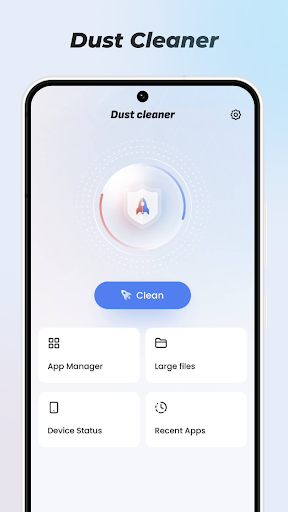
The application's core functionality revolves around four primary features: Junk Clean scans for temporary files, cache data, and residual files from uninstalled applications; App Manager identifies rarely used applications and facilitates batch uninstallation; Big File Filter categorizes and displays large media files and documents by size and type; Recent App provides launch history data showing application usage patterns over time. Each feature includes customizable scanning parameters and detailed file information before deletion.
User interface design follows conventional Android utility patterns with clear categorization, progress indicators during scans, and color-coded storage visualizations. The application employs one-tap cleaning operations while maintaining undo functionality for accidental deletions. Real-world usage typically involves periodic scanning sessions followed by selective file removal, with the Big File Filter proving particularly useful for media-heavy users managing photo and video collections.
Available user feedback, while limited in diversity, consistently praises the application's efficiency, though the repetitive nature of reviews from a single user (Saad simply sadagi, August 28, 2025) mentioning one-minute operation and subscription recommendations suggests potential review authenticity concerns. The absence of critical feedback in the provided dataset limits comprehensive analysis of user experience patterns across different device configurations and usage scenarios.
The application demonstrates effectiveness in storage reclamation through systematic file identification, though the lack of detailed technical documentation regarding scanning algorithms raises questions about deletion safety. Ideal for casual users seeking simplified storage management, professionals requiring granular file control may find the tools insufficiently detailed. Subscription requirements for advanced features, as mentioned in user reviews, represent a consideration for long-term usage costs against built-in Android storage tools.
Key Features
- •Junk Clean systematically identifies and removes temporary files, cache data, and residual application files to free up storage space efficiently
- •App Manager analyzes application usage patterns to suggest rarely used apps for removal, enabling batch uninstallation operations
- •Big File Filter scans storage to categorize large files by type and size, facilitating targeted management of media collections
- •Recent App tracker monitors application launch history, providing insights into usage patterns for informed management decisions
- •One-tap optimization executes predefined cleaning routines for users seeking quick storage reclamation without manual file selection
- •Storage visualization displays capacity usage through color-coded charts, helping users understand space allocation across file types
Why Users Love It
Comprehensive storage analysis
User-friendly interface design
Perfect for: Android users seeking simplified storage management and optimization
Screenshots


User Reviews
Syeed Sadiq Hussain
Sep 28, 2025★★★★★
very useful for me and efficient way to go back and efficient and reliable sources of information and is intended for me
Syeed Sadiq Hussain
Sep 28, 2025★★★★★
very useful for me and efficient way to go back and efficient and reliable sources of information and is intended for me
Syeed Sadiq Hussain
Sep 28, 2025★★★★★
very useful for me and efficient way to go back and efficient and reliable sources of information and is intended for me
Syeed Sadiq Hussain
Sep 28, 2025★★★★★
very useful for me and efficient way to go back and efficient and reliable sources of information and is intended for me
Syeed Sadiq Hussain
Sep 28, 2025★★★★★
very useful for me and efficient way to go back and efficient and reliable sources of information and is intended for me
App Details
Developer
World Leading Job Provider
Platform
androidRating
★4.8
Last Updated
10/13/2025





