Cut and Paste Photo Editor icon
Cut and Paste Photo Editor: Comprehensive Review of AI Image Editing Tool

by Daily Joy Studio

4.8
ANDROIDPhotography
AI-powered photo editor specializing in object cutting, background removal, and face swapping. Designed for casual users seeking quick collage creation without professional editing skills. Streamlines complex edits into two-step process.

Detailed Review

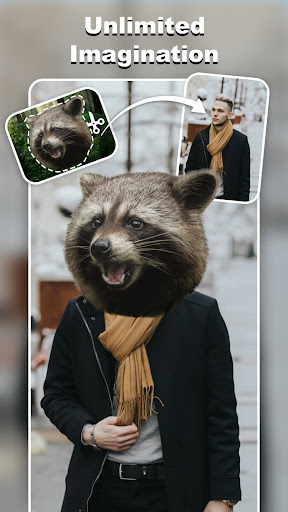
Cut and Paste Photo Editor by Daily Joy Studio represents a specialized approach to mobile image manipulation, focusing exclusively on object extraction and composition tasks. The Android application leverages artificial intelligence to simplify traditionally complex photo editing operations into an accessible two-step process, positioning itself in the growing market of simplified creative tools for non-professionals. The core functionality centers around AI-assisted object selection and background removal, enabling users to isolate subjects from photographs with minimal manual input. Additional features include face swapping capabilities, PNG image creation, and collage assembly tools. The application's algorithms demonstrate particular effectiveness with clear, high-contrast images where subject-background differentiation is distinct, though performance varies with complex compositions. User experience prioritizes simplicity through an interface that minimizes toolbar clutter and multi-step processes. The editing workflow involves selecting target areas through automatic detection or manual refinement, followed by placement into new compositions or backgrounds. Real-world usage patterns indicate most users employ the application for social media content creation, meme generation, and personal photo enhancement rather than professional graphic design work. User feedback reveals consistent appreciation for the application's core cutting functionality, though some limitations emerge in specific scenarios. Reginald D. Kinnaman noted on September 3, 2025, that while the application excels at PNG creation, face replacement features proved unreliable in their experience. Multiple reviewers expressed dissatisfaction with the subscription model, particularly the absence of one-time purchase options despite the application's intermittent usage patterns. The application demonstrates strongest performance in straightforward object extraction scenarios where users require quick background removal for social media content. Limitations appear in complex editing scenarios involving detailed hair selection, transparent objects, or low-contrast images. The subscription-based monetization strategy may prove problematic for casual users who require occasional access rather than continuous usage, though the free version provides basic functionality for intermittent needs.

Key Features

  • AI-powered object selection automatically detects and isolates subjects from backgrounds using machine learning algorithms
  • One-tap background removal instantly creates transparent PNG files suitable for digital compositions
  • Face swap technology allows users to exchange facial features between photographs for humorous effects
  • Collage creation tools enable combining multiple extracted objects into single cohesive images
  • Manual refinement brushes provide precision control for correcting AI selection inaccuracies
  • Export options include various image formats and quality settings for different use cases

Why Users Love It

Simplified AI editing workflow
Effective background removal

Perfect for: Casual users needing quick photo edits for social media

Screenshots

Cut and Paste Photo Editor screenshot 1Cut and Paste Photo Editor screenshot 2Cut and Paste Photo Editor screenshot 3Cut and Paste Photo Editor screenshot 4Cut and Paste Photo Editor screenshot 5Cut and Paste Photo Editor screenshot 6

Ranking History

Track Cut and Paste Photo Editor's performance in Photography over the last 30 days

Top 5
Top 10
Top 15
Below 15

Current Rank

#46

3 from last week

Best Rank

#43

All-time high

Average Rank

#45

30-day average

User Reviews

Reginald D. Kinnaman
Sep 3, 2025

love it for creating png images. wish I could buy it, but I only see a weekly subscription which I can't understand paying weekly, especially since I probably won't use it for months. I had no luck on the face replacement ones..

Reginald D. Kinnaman
Sep 3, 2025

love it for creating png images. wish I could buy it, but I only see a weekly subscription which I can't understand paying weekly, especially since I probably won't use it for months. I had no luck on the face replacement ones..

Reginald D. Kinnaman
Sep 3, 2025

love it for creating png images. wish I could buy it, but I only see a weekly subscription which I can't understand paying weekly, especially since I probably won't use it for months. I had no luck on the face replacement ones..

Jenneza Fugata
Nov 17, 2025

woww been too long since the last time I forgot how to edit but when I saw this app,there's feeling that i need to try and use the app and perfect I love it, highly recmmended

Jenneza Fugata
Nov 17, 2025

woww been too long since the last time I forgot how to edit but when I saw this app,there's feeling that i need to try and use the app and perfect I love it, highly recmmended

App Details

Developer

Daily Joy Studio

Platform

android

Rating

4.8

Last Updated

11/21/2025