
by Bose Corporation
Detailed Review
Key Features
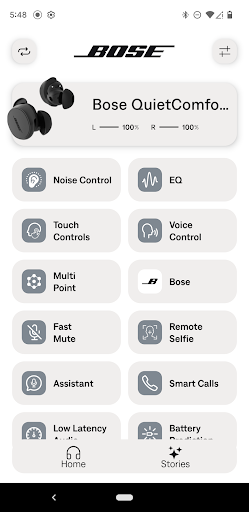
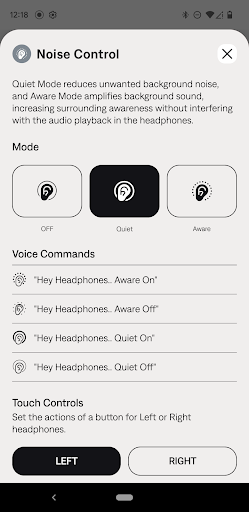
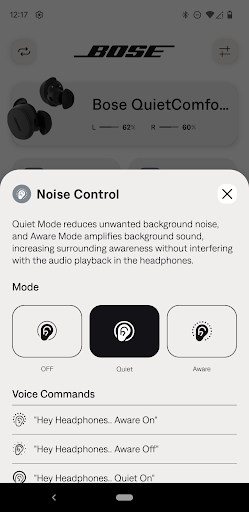
- •**Active Noise Cancellation Control**: A unique slider adjusts from full noise blocking to full transparency (Aware Mode), allowing precise environmental sound management for different situations.
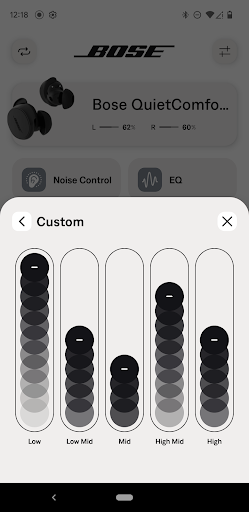
- •**Customizable EQ & Presets**: Offers several sound signature presets (Bass Boost, Treble Reduce, etc.) and a simple bass/treble slider for personalizing audio output to taste.
- • **Detailed Battery Management**: Displays precise percentage levels for each earbud and the charging case, providing clear insight into remaining power at a glance.
- •**Find My Earbuds Function**: Triggers a loud, audible tone from any misplaced earbud to help locate it, a practical solution for a common problem with small devices.
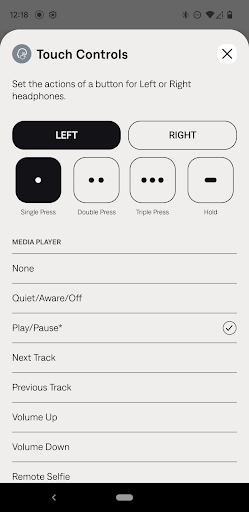
- •**Programmable Touch Controls**: Allows users to reassign tap-and-hold functions on each earbud independently for playback, volume, or voice assistant access.
- •**Integrated Product Support**: Provides direct access to user manuals, tutorial videos, and firmware update installation from within the app interface.
Why Users Love It
Perfect for: Perfect for owners of Bose QuietComfort Earbuds II who want to customize their audio experience and manage their device settings in detail.
Screenshots
Ranking History
Track Bose QC Earbuds's performance in Music & Audio over the last 30 days
Current Rank
#29
Best Rank
#29
All-time high
Average Rank
#29
30-day average
User Reviews
The BEST, but needs some improvements. It isn't as loud as I expecting it to be. Please you guys need to amp it up also in the app we should have more equalizer settings for more sound effects it's pretty dull for an expensive earbuds. I love the earbuds but it can be way better than this, thank you. Regards.
got a new phone... having trouble connecting please help. it just keeps rotating back to downloading a new app. I have bose quiet comfort ear buds and the app but it has a different option to choose as the ear buds and a different app also. but nothing ever connects..... got it figured out!
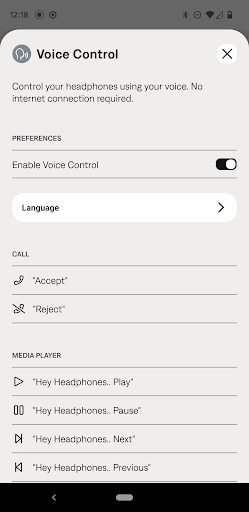
OMG, unbelievable sound and I had no idea that voice controls were even available, much less ready to go out of the box. Thank you, so very much.
The sound is incomparable!!!!! The voice assist is a game changer!! Wife now wants a pair!! Yes, get these!!!
Absolutely Love these headphones. I've had Jbl's and several others and these are by far these are the best sounding earphones. The sound is so crisp and clear, good bass and treble. The sound is amazing. I absolutely, recommend these headphones!!
App Details
Developer
Bose Corporation
Platform
androidRating
Last Updated
12/26/2025
Other Music & Audio Apps

Bose
Bose Corporation

Pandora - Music & Podcasts
Pandora
Beat Maker Pro - DJ Drum Pad
MWM - AI Music and Creative Apps

Pocket FM: Audio Series
Pocket FM Corp.

Suno - AI Music & Songs
Suno, Inc

Amazon Music: Songs & Podcasts
Amazon Mobile LLC