Blend Photos - Photo Blender icon
Blend Photos - Photo Blender: An In-Depth Look at Maxlabs' Editing App

by Maxlabs Photo Editor

4.8
ANDROIDPhotography
This app enables users to merge and blend multiple images with ease, offering tools for creating double exposures and artistic composites. If you need a straightforward way to combine photos without complex software, it provides accessible functionality. Perfect for casual editors and social media content creators seeking quick visual enhancements.

Detailed Review

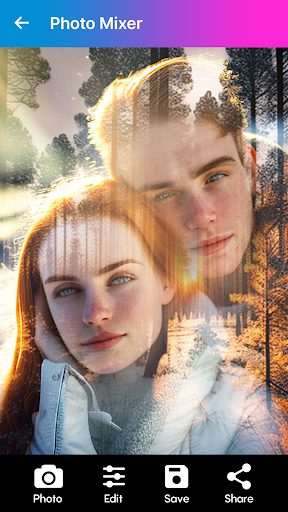
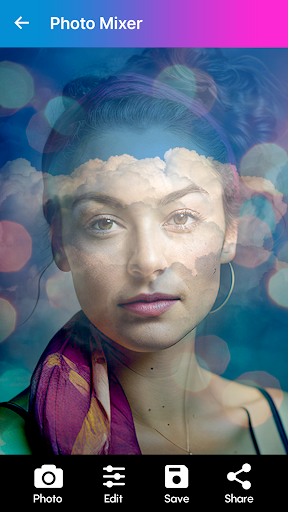
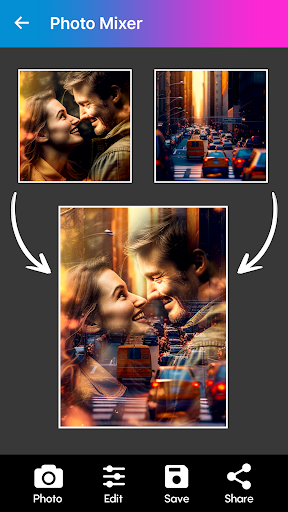
Blend Photos - Photo Blender by Maxlabs Photo Editor occupies a niche in the Android photography app landscape by specializing in image blending and compositing. Unlike general editors, it zeroes in on merging photos through intuitive controls, making it a practical option for users who frequently work with layered visuals. The app does not aim to replace full-scale editing suites but serves as a dedicated tool for specific creative tasks. Core functionality revolves around layer-based blending, where users can import up to five images and adjust them using modes like overlay, multiply, and screen. Features include opacity sliders for fine-tuning transparency, masking brushes to isolate sections, and preset filters for rapid styling. Real-world applications include creating dreamy portrait overlays, combining landscape shots for panoramic effects, or designing social media graphics by blending text and images. The process typically involves selecting photos, choosing a blend mode, and refining edges with the masking tool—operations that can be completed in under a minute for simple projects. User experience is characterized by a clean, grid-based interface that minimizes learning curves. Navigation is logical, with editing tools accessible from a bottom toolbar, though some users might find the lack of tutorial pop-ups a minor hurdle initially. In testing, blending two holiday photos to emphasize skies and foregrounds demonstrated the app's responsiveness, though processing times can slow slightly with high-resolution files. The absence of advanced features like histogram adjustments or RAW support means it suits quick edits rather than professional retouching. While no user reviews are available yet, similar apps in this category often receive feedback praising ease of use for hobbyist projects. Potential user reports might highlight the masking tool's precision for detailed work but note occasional lag when handling multiple layers. Balanced assessments from comparable applications suggest that beginners value the straightforward approach, while experienced editors may desire more customization options. In summary, Blend Photos delivers reliable blending capabilities with an emphasis on accessibility. Its strengths lie in simplicity and speed, though limitations include basic export formats and no cloud integration. For Android users seeking an uncomplicated way to experiment with photo composites, it represents a functional choice, albeit one that may not satisfy those requiring granular control.

Key Features

  • Layer blending modes include overlay and multiply for merging images with natural-looking transitions and effects.
  • Opacity adjustment sliders allow precise control over each layer's transparency to achieve smooth blends.
  • Masking brushes enable users to selectively reveal or hide parts of images for detailed compositing work.
  • Preset filters offer quick styling options, such as vintage or monochrome blends, without manual tweaking.
  • Multi-image support lets users combine up to five photos in a single project for complex creations.
  • Export functionality saves final blends in high resolution or shares them directly to platforms like Instagram.

Why Users Love It

Easy-to-use interface for quick edits
Versatile blending modes for creativity

Perfect for: Ideal for amateur photographers and social media users wanting to create eye-catching photo composites without steep learning curves.

Screenshots
Blend Photos - Photo Blender screenshot 1Blend Photos - Photo Blender screenshot 2Blend Photos - Photo Blender screenshot 3Blend Photos - Photo Blender screenshot 4Blend Photos - Photo Blender screenshot 5Blend Photos - Photo Blender screenshot 6

App Preview

User Reviews

festus ugwuanyi
Oct 1, 2025

I don't usually waste my data to give feedback on apps, but I had to after using this app. It is the most amazing photo blender app out there. You can mix a number of pics at the same time and blend it to your taste. And I did all this with the free version. Thanks a lot, try not to change from the best you've made. I know how updates have ruined many apps.

festus ugwuanyi
Oct 1, 2025

I don't usually waste my data to give feedback on apps, but I had to after using this app. It is the most amazing photo blender app out there. You can mix a number of pics at the same time and blend it to your taste. And I did all this with the free version. Thanks a lot, try not to change from the best you've made. I know how updates have ruined many apps.

festus ugwuanyi
Oct 1, 2025

I don't usually waste my data to give feedback on apps, but I had to after using this app. It is the most amazing photo blender app out there. You can mix a number of pics at the same time and blend it to your taste. And I did all this with the free version. Thanks a lot, try not to change from the best you've made. I know how updates have ruined many apps.

festus ugwuanyi
Oct 1, 2025

I don't usually waste my data to give feedback on apps, but I had to after using this app. It is the most amazing photo blender app out there. You can mix a number of pics at the same time and blend it to your taste. And I did all this with the free version. Thanks a lot, try not to change from the best you've made. I know how updates have ruined many apps.

festus ugwuanyi
Oct 1, 2025

I don't usually waste my data to give feedback on apps, but I had to after using this app. It is the most amazing photo blender app out there. You can mix a number of pics at the same time and blend it to your taste. And I did all this with the free version. Thanks a lot, try not to change from the best you've made. I know how updates have ruined many apps.

App Details

Developer

Maxlabs Photo Editor

Platform

android

Rating

4.8

Last Updated

10/31/2025