Auto Clicker - Automatic tap icon
Auto Clicker - Automatic Tap: A Deep Dive into Its Features and Performance

by True Developers Studio

4.5
ANDROIDTools
This app automates screen tapping on Android devices, offering a hands-free solution for repetitive tasks in gaming and other applications. Users appreciate its speed and customization options, though some note challenges with ad interruptions and initial setup. A reliable tool for those needing consistent automated input without manual effort.

Detailed Review

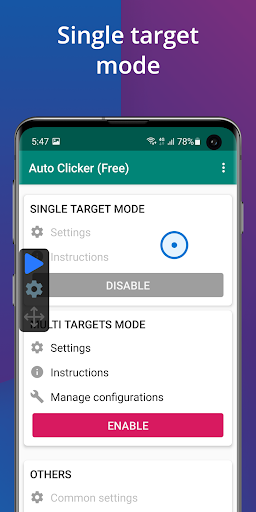
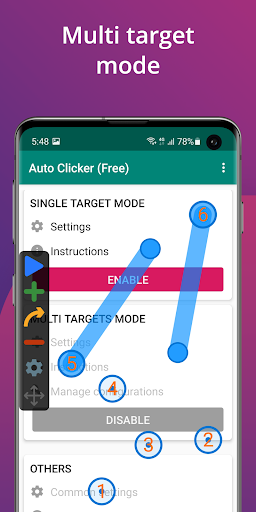
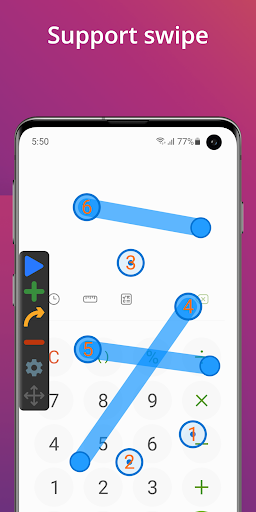
Auto Clicker - Automatic Tap by True Developers Studio serves as a dedicated automation tool for Android, enabling users to simulate screen taps without physical interaction. It occupies a niche in the utilities market, particularly appealing to gamers and individuals performing repetitive digital tasks. The app's straightforward approach to automation has garnered a loyal user base, evidenced by its high rating and frequent updates. Core features include customizable tap intervals, multi-point tapping support, and adjustable click speeds, allowing precise control over automation sequences. Users can program sequences with specific delays and locations, making it suitable for scenarios like idle game farming or data entry. The interface provides floating controls for easy activation and deactivation, though some configurations may require trial and error to optimize for complex applications. Real-world usage shows it effectively reduces physical strain in extended gaming sessions or routine app testing. User experience varies, with many finding the app intuitive for basic tasks but occasionally cumbersome for advanced programming. In gaming contexts, it automates actions such as resource collection or button spamming, saving time and effort. However, the learning curve for setting up multi-step sequences can be steep for newcomers. Reviews indicate that while the app performs reliably once configured, the presence of ads can disrupt workflow, prompting some to seek ad-blocking solutions or older versions. Feedback trends highlight consistent praise for the app's efficiency and speed, with users reporting it outperforms manual tapping in games like 'Poop Everything' or similar titles. One reviewer mentioned, 'ive had real good experience using this app,' emphasizing long-term utility despite setup hurdles. Criticisms frequently cite intrusive advertisements and unresponsive customer service, as seen in comments advising internet blocking to mitigate ad frequency. These elements underscore a divide between the app's functional strengths and its monetization strategy. In balance, Auto Clicker - Automatic Tap delivers capable automation for everyday use, with its primary appeal lying in speed and customization. The ad-supported model and occasional usability issues present minor drawbacks, but for users seeking affordable tap automation, it remains a practical choice. Its performance in reducing repetitive strain and enhancing productivity in supported apps justifies its popularity, though prospective users should weigh the ad experience against their needs.

Key Features

  • Customizable tap intervals allow users to set precise delays between clicks, optimizing automation for various app responses.
  • Multi-point tapping support enables simultaneous taps at different screen locations, useful for complex game strategies.
  • Adjustable click speeds let users control taps per second, from slow deliberate actions to rapid-fire sequences.
  • Floating control interface provides easy access to start, stop, and modify automation without exiting active apps.
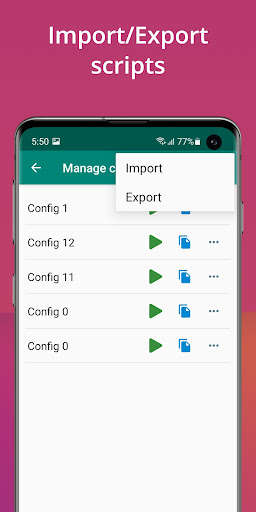
  • Save and load configurations feature allows reuse of tap patterns, streamlining repeated tasks across sessions.
  • No-root operation ensures broad compatibility with most Android devices, avoiding technical barriers for average users.

Why Users Love It

Fast and reliable automation
Easy setup for basic tasks

Perfect for: Ideal for mobile gamers and users requiring repetitive screen interaction automation.

Screenshots

Auto Clicker - Automatic tap screenshot 1Auto Clicker - Automatic tap screenshot 2Auto Clicker - Automatic tap screenshot 3Auto Clicker - Automatic tap screenshot 4Auto Clicker - Automatic tap screenshot 5Auto Clicker - Automatic tap screenshot 6

App Preview

Ranking History

Track Auto Clicker - Automatic tap's performance in Tools over the last 30 days

Top 5
Top 10
Top 15
Below 15

Current Rank

#41

Best Rank

#41

All-time high

Average Rank

#46

30-day average

User Reviews

Diane Mageary
Nov 8, 2025

ive had real good experience using this app. not always the easiest to programs with your game, but ive used it for many years.

Diane Mageary
Nov 8, 2025

ive had real good experience using this app. not always the easiest to programs with your game, but ive used it for many years.

Ron Pic
Nov 13, 2025

Sadly the best of all applications aim for this job. You will need to block the internet for this app or you'll have many ads. Best find an older version and use it. Alot to fix but never got reply from cs.

Misha Akhter
Nov 11, 2025

nah dude the auto clicker is so broken it hurt my fingers pressing well this app made it so easy it even click faster than my hands its so good and if u click nah u need to use this app this app is so good i appreciate the app thanks for making this app:)

Luke Lam
Nov 10, 2025

amazing,I can literally spam! like I can spam "poop"over ond over in the game "poop everything" and with this app a made a poop machine gun,yay

App Details

Developer

True Developers Studio

Platform

android

Rating

4.5

Last Updated

11/16/2025