Amazon Kids Parent Dashboard icon
Managing Screen Time: A Deep Dive into Amazon Kids Parent Dashboard

by Amazon Mobile LLC

4.2
ANDROIDEntertainment
Designed to help parents manage their children's digital consumption, this app provides centralized control over Amazon Kids+ content and device usage. It serves as a monitoring hub for activity reports, time limits, and educational goals. For households invested in Amazon's ecosystem of Fire tablets and Echo devices, it offers a straightforward way to oversee screen time.

Detailed Review

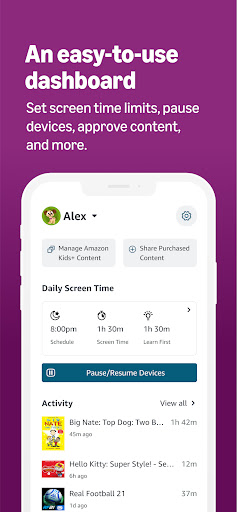
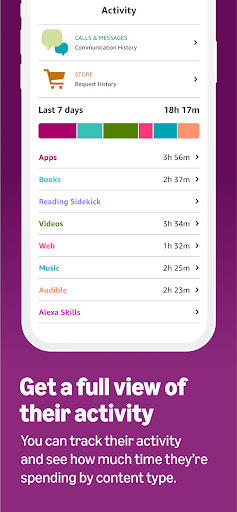
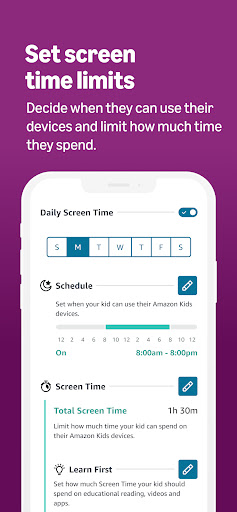
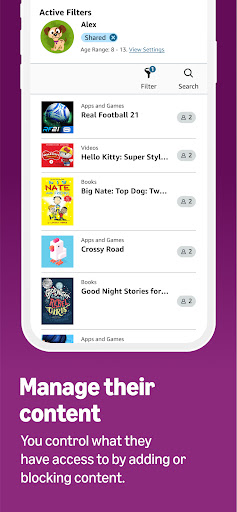
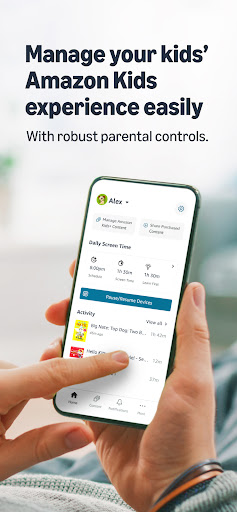
The Amazon Kids Parent Dashboard operates as a free companion application to the Amazon Kids+ subscription service, functioning as a remote control for children's digital activities within Amazon's walled garden. Its primary role is to give caregivers oversight and management tools for Fire tablets, Kindle e-readers, and compatible Echo devices used by children. Unlike broader third-party parental control suites, this app is specifically tailored to Amazon's content library and hardware, positioning itself as a specialized tool for a specific ecosystem. Core functionality revolves around three pillars: time management, content filtering, and progress tracking. Parents can set daily time limits for weekdays and weekends, with the ability to grant extra time remotely. The content filter allows whitelisting or blacklisting of specific titles, websites, and apps accessible through the Kids+ interface. A notable feature is the ability to set educational goals, requiring a child to spend a designated amount of time in approved learning apps or books before unlocking access to entertainment content. This creates a structured, incentive-based approach to device use. In practice, the dashboard presents a clean, card-based interface showing each child's profile, current time used, and recently accessed content. Making adjustments is generally intuitive, such as pausing a device instantly or adjusting a bedtime schedule. However, its utility is entirely dependent on the child using an Amazon device registered to their profile; it cannot manage activity on a school-issued Chromebook or a family iPad. Some users note a slight delay in the activity report syncing, meaning recent usage might not appear for several minutes. While detailed public reviews for this standalone app are sparse, feedback on the overall Amazon Kids+ ecosystem from parent forums and retail listings indicates appreciation for the centralized control. Common praises highlight the simplicity of setting time limits and the value of the detailed activity report, which lists every book read and video watched. Criticisms occasionally point to a desire for more granular controls, such as limiting specific apps individually rather than applying a blanket daily limit, and some frustration when content filtering behaves inconsistently across different device types. Overall, the Amazon Kids Parent Dashboard is a competent and purpose-built tool that succeeds within its defined scope. For families already using Amazon Kids+ on Fire tablets, it is effectively indispensable for implementing basic digital ground rules. Its limitations are primarily ecosystem-based; it is not a universal parental control solution. The app delivers reliable core features for monitoring and restricting Amazon device use, though power users might find its customization options somewhat basic compared to dedicated third-party services.

Key Features

  • Daily Time Limits & Schedules: Set distinct time allowances for weekdays and weekends, with remote pausing and extra time grants directly from the parent's phone.
  • Content Filtering & Approvals: Manually approve or block specific books, apps, videos, and websites within the Amazon Kids+ universe before a child can access them.
  • Detailed Activity Reports: View a chronological log of everything a child interacts with, including titles of books read, videos watched, and apps used.
  • Bedtime & Quiet Hours: Schedule specific times where the child's device becomes inaccessible, helping to enforce consistent offline periods overnight.
  • Educational Goal Setting: Require a child to spend a set amount of time in educator-approved content before gaining access to games and entertainment media.
  • Multiple Child Profiles: Manage settings individually for each child in a household, with customized time limits and content filters per profile.

Why Users Love It

Centralized control for Amazon devices
Focus on balancing education with entertainment

Perfect for: Parents and caregivers who use Amazon Fire tablets or Echo devices for their children's entertainment and learning.

Screenshots
Amazon Kids Parent Dashboard screenshot 1Amazon Kids Parent Dashboard screenshot 2Amazon Kids Parent Dashboard screenshot 3Amazon Kids Parent Dashboard screenshot 4Amazon Kids Parent Dashboard screenshot 5Amazon Kids Parent Dashboard screenshot 6

Ranking History

Track Amazon Kids Parent Dashboard's performance in Entertainment over the last 30 days

Top 5
Top 10
Top 15
Below 15

Current Rank

#20

Best Rank

#20

All-time high

Average Rank

#20

30-day average

User Reviews

Ritz Bitz
Nov 17, 2025

Pretty good. Some limitations, including not being able to see what is taking up so much space on the device remotely. That would be a nice plus, instead of having to manage it directly from the device. Otherwise, for the features it offers, great.

Ritz Bitz
Nov 17, 2025

Pretty good. Some limitations, including not being able to see what is taking up so much space on the device remotely. That would be a nice plus, instead of having to manage it directly from the device. Otherwise, for the features it offers, great.

Ritz Bitz
Nov 17, 2025

Pretty good. Some limitations, including not being able to see what is taking up so much space on the device remotely. That would be a nice plus, instead of having to manage it directly from the device. Otherwise, for the features it offers, great.

Ritz Bitz
Nov 17, 2025

Pretty good. Some limitations, including not being able to see what is taking up so much space on the device remotely. That would be a nice plus, instead of having to manage it directly from the device. Otherwise, for the features it offers, great.

Ritz Bitz
Nov 17, 2025

Pretty good. Some limitations, including not being able to see what is taking up so much space on the device remotely. That would be a nice plus, instead of having to manage it directly from the device. Otherwise, for the features it offers, great.

App Details

Developer

Amazon Mobile LLC

Platform

android

Rating

4.2

Last Updated

12/26/2025