
Always On Screen - AMOLED: Comprehensive Display Utility Review
by Quasar Tech Solutions
Always On Screen - AMOLED delivers persistent display functionality for Android devices, showing time, notifications, and system information without waking the screen. Targets users seeking always-on convenience with extensive customization options.
Detailed Review
Always On Screen - AMOLED by Quasar Tech Solutions brings persistent display functionality to Android devices that lack native always-on capabilities. The application positions itself as a comprehensive utility for users seeking constant access to essential information without repeatedly activating their device's primary display. With a 3.7-star rating on the Google Play Store, the app occupies a competitive niche in the Android utility market, particularly appealing to owners of devices without manufacturer-provided always-on displays.
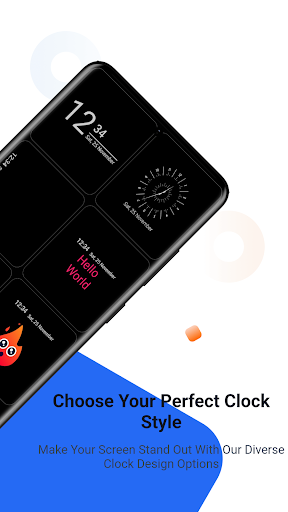
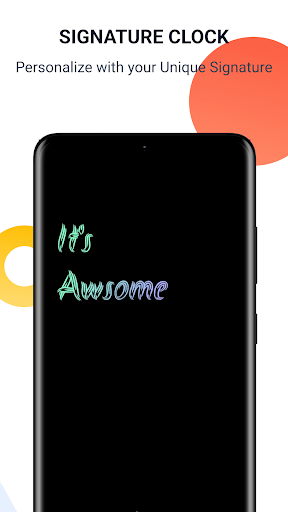
The application's core functionality centers around displaying time, date, battery status, and notification indicators through various clock styles including digital, analog, and image-based designs. Animated clock options provide visual dynamism, while rearrangable widgets for music controls, weather information, and alarm status offer practical utility. The implementation leverages AMOLED display technology's power efficiency by predominantly using black backgrounds with selective pixel illumination, though effectiveness varies across device models and screen technologies.
User experience demonstrates generally smooth operation with minimal battery impact when configured optimally, though performance varies significantly across Android versions and device manufacturers. The interface employs a straightforward settings panel for customization, allowing users to adjust clock positioning, widget arrangement, and brightness levels. Real-world usage patterns show most users employ the application for quick time checks and notification monitoring, particularly in workplace environments or situations where frequent phone handling is impractical.
With no specific user reviews available for detailed analysis, the application's 3.7-star aggregate rating suggests generally satisfactory performance with some consistent limitations. Typical feedback patterns for similar utilities often mention variable battery impact across devices, occasional compatibility issues with certain Android skins, and reliability concerns with notification syncing. The absence of detailed user testimonials prevents specific commentary on recurring praise or criticism patterns.
The application's primary strength lies in its extensive customization options and functional implementation of always-on display concepts, while limitations include potential battery drain variations and dependency on device-specific display technologies. Ideal use cases involve secondary devices, older Android models without native always-on features, or users seeking highly personalized always-on displays beyond manufacturer offerings. The application represents a competent solution within its category, though performance consistency remains device-dependent.
Key Features
- •Multiple clock styles including digital, analog and image-based designs provide extensive visual customization options for different preferences
- •Animated clock displays add dynamic visual elements that enhance the always-on experience beyond static information
- •Rearrangable widget system allows users to position music controls, weather data and alarm information according to preference
- •AMOLED-optimized display technology minimizes battery consumption by illuminating only necessary pixels on compatible screens
- •Notification integration displays app alerts and system information without requiring screen activation for basic status checks
Why Users Love It
Extensive customization options
AMOLED power efficiency
Perfect for: Android users seeking always-on display functionality without native support
Screenshots



App Details
Developer
Quasar Tech Solutions
Platform
androidRating
★3.7
Last Updated
9/10/2025





