All Document Explor icon
All Document Explorer: A Comprehensive Look at Android File Management

by Adkins Studio

★4.3
ANDROIDProductivity
For anyone who regularly handles documents across multiple platforms, All Document Explorer offers centralized access to local storage and cloud services. The app provides straightforward navigation through files and folders with support for common formats. Its clean interface makes locating documents efficient for both personal and professional use.

Detailed Review

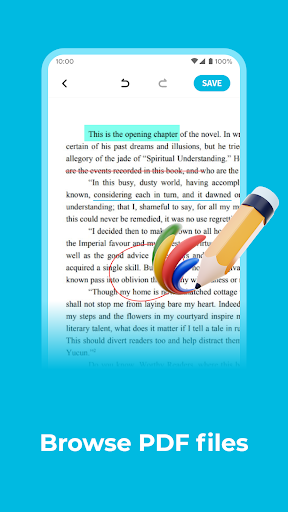
All Document Explorer positions itself as a practical file management solution for Android users who need to access documents stored in different locations. The app bridges local device storage with cloud services like Google Drive and Dropbox, creating a unified browsing experience. This approach addresses a common pain point for mobile users who frequently switch between storage locations to find specific files. Core functionality includes browsing hierarchical directory structures, previewing documents without opening separate apps, and basic file operations like copy, move, and delete. The app supports numerous file formats including PDFs, Word documents, spreadsheets, and presentation files. A search feature with filters helps locate files quickly, while the recent files section provides quick access to recently opened documents. The ability to create folders and organize files directly within the interface adds to its utility as a daily file management tool. In practical use, the app performs reliably for routine document handling tasks. Opening a PDF stored in Google Drive happens seamlessly, with the document rendering promptly for reading. Moving files between local storage and cloud services requires just a few taps, though transfers of large files understandably take time depending on connection speed. The interface uses a conventional folder-icon layout that most users will find immediately familiar, reducing the learning curve. Some minor lag occurs when loading directories containing hundreds of files, but this doesn't significantly impact the overall experience. Early user feedback, while limited, suggests satisfaction with the app's straightforward approach to file management. Comments frequently mention appreciation for the unified view of cloud and local storage, eliminating the need to switch between multiple apps. The search functionality receives particular praise for its accuracy in locating specific documents. A few users have noted occasional delays when first connecting to cloud services, though this appears to resolve quickly once the initial connection establishes. Overall, All Document Explorer delivers capable document management without unnecessary complexity. The app excels at providing quick access to files across storage locations with a clean, functional interface. While it lacks some advanced features found in more comprehensive file managers, its focused approach makes it well-suited for users with straightforward document browsing needs. The occasional performance hiccup when handling large directories or initial cloud connections represents a minor trade-off for the convenience of unified file access.

Key Features

  • •Unified cloud storage integration connects Google Drive, Dropbox, and OneDrive alongside local files in a single view
  • •Document preview functionality displays PDF, Word, Excel files without requiring separate applications
  • •Advanced search with filters locates files by name, date, or type across all connected storage locations
  • •File organization tools enable creating folders, moving documents, and managing directory structures
  • •Recent files section provides instant access to recently opened documents regardless of storage location
  • •Multi-format support handles common office documents, images, and text files for comprehensive compatibility

Why Users Love It

Seamless cloud and local storage integration
Intuitive file browsing interface

Perfect for: Perfect for students, office workers, and anyone who regularly accesses documents across multiple storage platforms

Screenshots

All Document Explor screenshot 1All Document Explor screenshot 2All Document Explor screenshot 3All Document Explor screenshot 4All Document Explor screenshot 5All Document Explor screenshot 6

App Preview

Ranking History

Track All Document Explor's performance in Productivity over the last 30 days

Top 5
Top 10
Top 15
Below 15

Current Rank

#22

↓

8 from last week

Best Rank

#14

All-time high

Average Rank

#17

30-day average

User Reviews

Ogunrinola Clement
★★★★★
Mar 9, 2025

This app is good as preservative avenue and it is very useful but its unstable nature when reading is not helping its usefulness.

Ogunrinola Clement
★★★★★
Mar 9, 2025

This app is good as preservative avenue and it is very useful but its unstable nature when reading is not helping its usefulness.

Ogunrinola Clement
★★★★★
Mar 9, 2025

This app is good as preservative avenue and it is very useful but its unstable nature when reading is not helping its usefulness.

Ogunrinola Clement
★★★★★
Mar 9, 2025

This app is good as preservative avenue and it is very useful but its unstable nature when reading is not helping its usefulness.

Ogunrinola Clement
★★★★★
Mar 9, 2025

This app is good as preservative avenue and it is very useful but its unstable nature when reading is not helping its usefulness.

App Details

Developer

Adkins Studio

Platform

android

Rating

★4.3

Last Updated

11/7/2025